Skip to content
  • Categories
  • Recent
  • Tags
  • Popular
  • World
  • Users
  • Groups
Skins
  • Light
  • Brite
  • Cerulean
  • Cosmo
  • Flatly
  • Journal
  • Litera
  • Lumen
  • Lux
  • Materia
  • Minty
  • Morph
  • Pulse
  • Sandstone
  • Simplex
  • Sketchy
  • Spacelab
  • United
  • Yeti
  • Zephyr
  • Dark
  • Cyborg
  • Darkly
  • Quartz
  • Slate
  • Solar
  • Superhero
  • Vapor

  • Default (No Skin)
  • No Skin
Collapse
Brand Logo

FOP2 Community Forum

  1. Home
  2. Plugins
  3. FOP2 Queue Login Module Problem

FOP2 Queue Login Module Problem

Scheduled Pinned Locked Moved Plugins
6 Posts 4 Posters 408 Views
  • Oldest to Newest
  • Newest to Oldest
  • Most Votes
Reply
  • Reply as topic
Log in to reply
This topic has been deleted. Only users with topic management privileges can see it.
  • O
    O
    Omid.Mohajerani
    wrote on last edited by
    #1

    Hello,

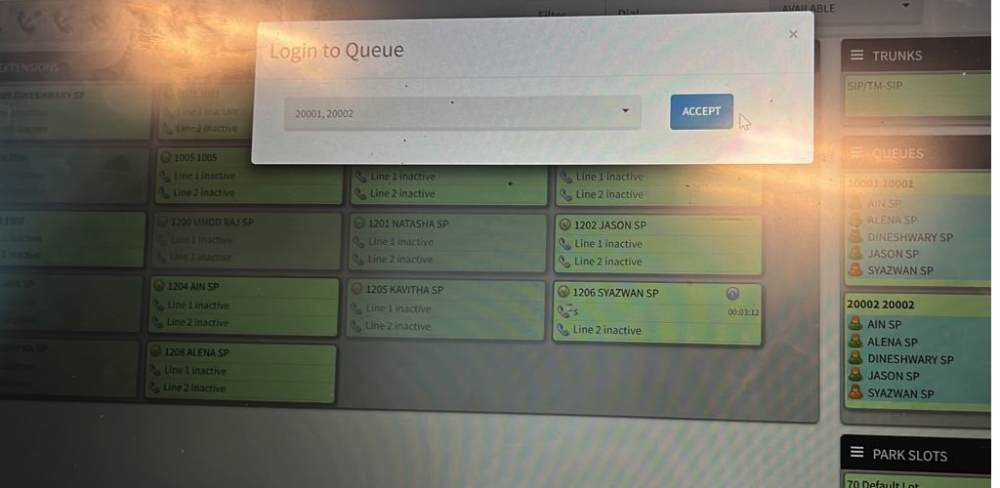
    I have a problem with the recent fop2 installation. I'm using the Queue Login module to select queues. Agents can log in and select the queue and everything works but After some time the Queue selection page appears again and again although the Agent is login into the queue. I used both Microsoft edge and chrome. Is there anyway to troubleshoot?
    1 Reply Last reply
    0
    • O
      O
      Omid.Mohajerani
      wrote on last edited by
      #2

      I have enable the logout_callback_timeout=300 and restarted fop2 but it didnt help .

      1 Reply Last reply
      0
      • N
        N
        nicolas
        wrote on last edited by
        #3

        Usually this happens when there is actually a client disconnection (browser disconnects from websocket). the logout callback_timeout prevents the logout callback to trigger, but it won't prevent the GUI from refreshing. The fix is trying to find out why clients are being disconnected, there are other settings in fop2.cfg that will force client disconnections (kick_inactive_clients and client_timeout). You will want to check those settings in fop2.cfg (client_timeout=0 and kick_inactive_clients=5000) or something to that effect. Also, do not put FOP2 tab as a background tab as Chrome might want to economize battery and close every connection from the tab, triggering that problem.

        1 Reply Last reply
        0
        • F
          F
          frank_astiostech.com
          wrote on last edited by
          #4

          Hi, we are facing the same problem with this new version, if the agent is not active for some time, for example if he is paused, then the client is disconnected, we tried all option you also suggest but to no avail, even when the in a single TAB.
          Our solution is to downgrade back to Version: 2.31.28 (since we never had this problem with that version) and after we downgraded to that version the issues are gone.
          So I do believe that the this version 2.31.34 has this disconnect issue and I hope you will look into it.
          You can also test it without the Queue login, pause the agent and wait for some time, then you will see in the Asterisk CLI the agents in "not in use" i.e. he was disconnected and connected back, but the agent in FOP2 panel still shows in pause.

          1 Reply Last reply
          0
          • K
            K
            kiziuk
            wrote on last edited by
            #5

            Our solution is to downgrade back to Version: 2.31.28

            I put a new version on the fresh box and I am having similar issue. Would you provide a way to safely downgrade from 2.31.39 as I can't find the build to download it.

            1 Reply Last reply
            0
            • K
              K
              kiziuk
              wrote on last edited by
              #6

              It looks like in my case there was an issue with a new config option that is set to 120 seconds by default.
              kick_inactive_clients=0
              It caused the WebRTC client to be forcefully disconnected when the connection was idle.

              1 Reply Last reply
              0

              Hello! It looks like you're interested in this conversation, but you don't have an account yet.

              Getting fed up of having to scroll through the same posts each visit? When you register for an account, you'll always come back to exactly where you were before, and choose to be notified of new replies (either via email, or push notification). You'll also be able to save bookmarks and upvote posts to show your appreciation to other community members.

              With your input, this post could be even better 💗

              Register Login
              Reply
              • Reply as topic
              Log in to reply
              • Oldest to Newest
              • Newest to Oldest
              • Most Votes


              • Login

              • Don't have an account? Register

              • Login or register to search.
              Powered by NodeBB Contributors
              • First post
                Last post
              0
              • Categories
              • Recent
              • Tags
              • Popular
              • World
              • Users
              • Groups