
Disable WordWrap in extension monitor
-
Hi,
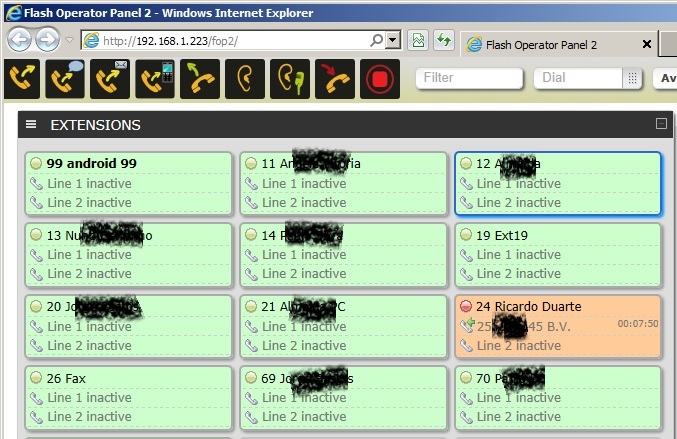
In the extension monitor, the name associated to the extension, could have wordwrap disabled, due to long names, I dont see the full text, with wordwrap disabled, at least I can see some of the info and identify who's calling.
Check the attached image in:http://neotrix.decimal.pt/bugs/fop2_wordwrap.jpg
You can see in the extension that is active, it has the name "B.V. Maria Manuel Acola", but i'm only seing "B.V."
Thanks in advanced,
Jorge Bastos, -
You can change the style to your heart's content by editing /var/www/html/fop2/css/operator.css
Make buttons wider, font smaller, disable overflow:hidden, etc. There are several posts talking about that.
Finally, if you mouse over a cut name, it will popup the full name.
We prefer to have a fixed layout with regular sized buttons, instead of a variable height layout. But you can very well change it as it is plain html/css
Best regards,
-
-
Setting the text to something else than overflow:hidden will hinder the layout/view in some way or another. It is the browser job to determine what text to hide, different browsers/os behave a little bit differently, there is not a hard set or config for make it work better. You can always play with css and perhaps find a better way, perhaps using ellipsis, text-overflow or a combination. If you come up with a better alternative of styling please share it!

Hello! It looks like you're interested in this conversation, but you don't have an account yet.
Getting fed up of having to scroll through the same posts each visit? When you register for an account, you'll always come back to exactly where you were before, and choose to be notified of new replies (either via email, or push notification). You'll also be able to save bookmarks and upvote posts to show your appreciation to other community members.
With your input, this post could be even better 💗
Register Login