
FOP2 with SSL. Trouble and a clarification for docs.
-
Hi Mitch,
Did you try the suggestions as pointed in the FAQ?
http://www.fop2.com/docs/faq.php#IcannotconnecttoFOP2whileusingHTTPS/SSL
Here is the content/answer:###I cannot connect to FOP2 while using HTTPS/SSL
When you use SSL to connect to your web server, you must configure the FOP2 server to use the same SSL certificates as your web server in order for the browser to allow secure websockets connections. If not, then the browser will refuse negotiation of secure websockets.
So, you must edit your fop2.cfg file and add the proper certificate files. If you use stock FOP2, you can find your fop2.cfg file in /usr/local/fop2. If you installed it via RPM (Issabel, Ombutel), the file is in /etc/asterisk/fop2.
The settings you want to modify are:
- ssl_certificate_file
- ssl_certificate_key_file
If you use Letsencrypt SSL certificates, you might need to set them to something similar to this:
ssl_certificate_file=/etc/letsencrypt/live/www.yourdomain.com/cert.pem
ssl_certificate_key_file=/etc/letsencrypt/live/www.yourdomain.com/privkey.pem
Most usually letsencrypt and certbot utilities will save the certificates on /etc/letsencrypt/live/www.yourdomain.com so the above settings would be correct (just use the correct domain name instead of yourdomain.com). If you are not sure, you can search for those files on your drive and be sure to set the accordingly on FOP2.
In order to find out which certificates are in use, if you use a Centos based system and Apache web server, you can run this command:
grep ^SSLCertificate /etc/httpd/conf.d/*Inspect the output and look for the paramters SSLCertificateFile and SSLCertificateKeyFile, take note on their values and set them on the corresponding entries in fop2.cfg.
AFter the change, restart FOP2 with the command:
service fop2 restart -
Yes for sure - that's what I was saying - but my curiousity was if a missing chain file mattered. Or where I'd see the SSL referenced in the debug output to find my error.
I have
ssl_certificate_file=/etc/letsencrypt/live/MYDOMAIN/cert.pem
ssl_certificate_key_file=/etc/letsencrypt/live/MYDOMAIN/privkey.pem
which are normal files used by apache in my httpd.conf and are current (i.e not expired).
I dont see any reference to cert.pem in fop2_debug.log
I do see a bunch of lines like this:
Not a reference at all
Not sure what that means though.
After enabling SSL non-SSL still works. No error except that the secure socket would not connect.
I don't see any obvious reason for a permission issue? Thought I looked.
lrwxrwxrwx 1 root root 42 Sep 1 00:05 /etc/letsencrypt/live/MYDOMAIN/cert.pem -> ../../archive/MYDOMAIN/cert15.pem
-rw-r--r-- 1 root root 2264 Sep 1 00:05 /etc/letsencrypt/archive/MYDOMAIN/cert15.pem
Cheers!
m -
Hi,
On the server side, if debug is enabled (-X parameter, at least level 1), and if you have a permission issue with cert files or a misconfiguration on the .cfg file, you will see a messge like this on the FOP2 server debug log:** SSL Certificate File cannot be read (/path/to/cert.pm). Disabling TLS
That's the only thing you can check on the server side. Then you have the client side (browser), and for that you must look at the developer/javascript console on the browser itself.
It appears you have things set correctly, and that should work. You must also be using the same hostname on the browser url than the one the certificate was issued, it might refuse to connect if you use an ip address or a local domain name instead of the actual hostname the certificate was issued for.
Best regards,
-
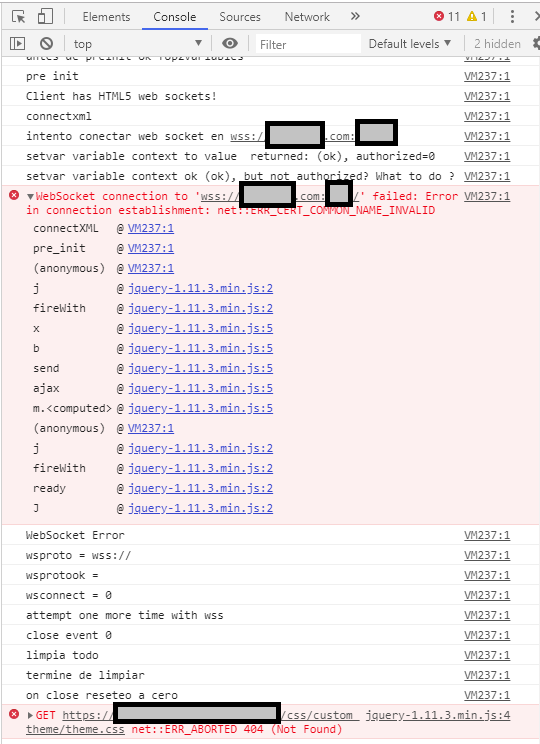
The main issue seemed to be net::ERR_CERT_COMMON_NAME_INVALID - but the cert "seems" ok.
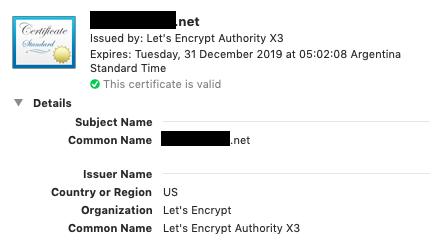
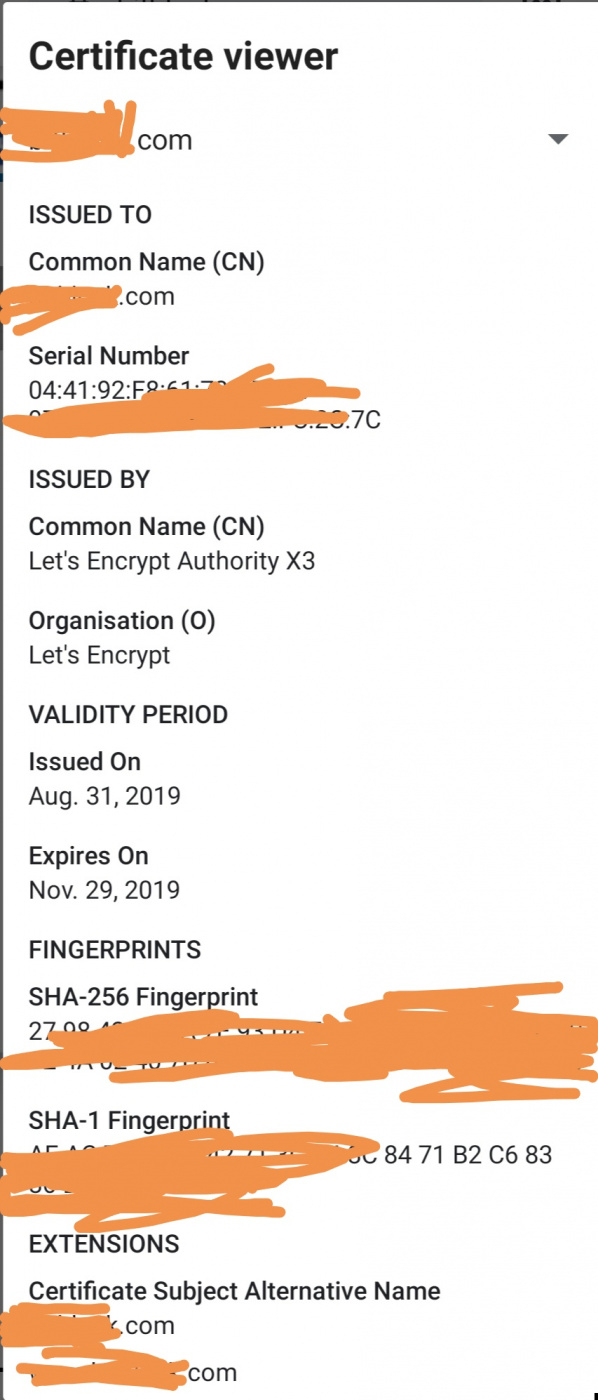
The cert works in all browsers - it's form let's encrypt and is current / valid in terms of date.The certificate has:
CN = DOMAIN.com
And Certificate subject alt name:
DNS Name=DOMAIN.com
DNS Name=www.DOMAIN.comAs an aside... I noticed in the errors there was also custom/theme/theme.css - does that mean potentially one can change the css using that?
Thanks!
-
-
I tried using both ways

In firefox, and chrome.
https://DOMAIN.com
and
https://www.DOMAIN.com
Web pages can be viewed either way. -
-
-
Hi,
Your certificate has a subject alternative name defined, not sure if that is somehow affecting the websocket connection.
How did you obtain the certificate via Letsencrypt? any specific command to get that section? If you can catch me on the live help I would like to review your site (or send me a private message, not sure if this forum has such feature), and if possible I would like to try getting a certificate in the same way you did with yours.Best regards,
-
Hello! It looks like you're interested in this conversation, but you don't have an account yet.
Getting fed up of having to scroll through the same posts each visit? When you register for an account, you'll always come back to exactly where you were before, and choose to be notified of new replies (either via email, or push notification). You'll also be able to save bookmarks and upvote posts to show your appreciation to other community members.
With your input, this post could be even better 💗
Register Login