Skip to content
  • Categories
  • Recent
  • Tags
  • Popular
  • World
  • Users
  • Groups
Skins
  • Light
  • Brite
  • Cerulean
  • Cosmo
  • Flatly
  • Journal
  • Litera
  • Lumen
  • Lux
  • Materia
  • Minty
  • Morph
  • Pulse
  • Sandstone
  • Simplex
  • Sketchy
  • Spacelab
  • United
  • Yeti
  • Zephyr
  • Dark
  • Cyborg
  • Darkly
  • Quartz
  • Slate
  • Solar
  • Superhero
  • Vapor

  • Default (No Skin)
  • No Skin
Collapse
Brand Logo

FOP2 Community Forum

  1. Home
  2. Support
  3. Queue box not showing

Queue box not showing

Scheduled Pinned Locked Moved Support
3 Posts 2 Posters 425 Views
  • Oldest to Newest
  • Newest to Oldest
  • Most Votes
Reply
  • Reply as topic
Log in to reply
This topic has been deleted. Only users with topic management privileges can see it.
  • A
    A
    assistenza
    wrote on last edited by
    #1

    Hi,
    My installation:
    CentOS 64 bit from ISO SANGOMA with FreePBX 15 and Asterisk 16.
    FOP2 2.31.27 - FireFox browser (MacOS Catalina)
    Asterisk, FreepBX and FOP2 (currently not licensed) are functioning and installed correctly.
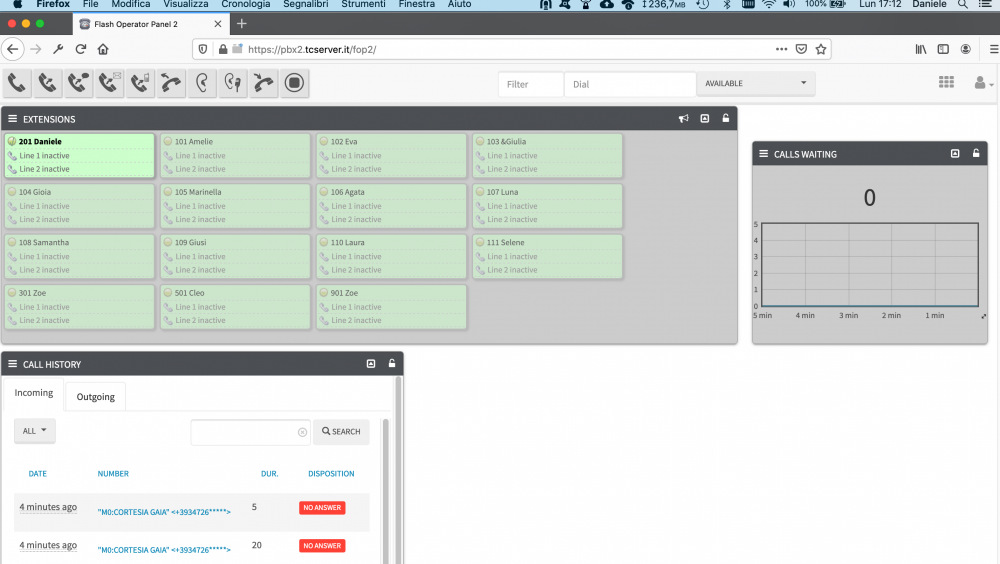
    Unfortunately, the queue box to the right of the fop2 panel does not appear.
    The menu that appears at each extension also displays only SEND EMAIL, SEND SMS.
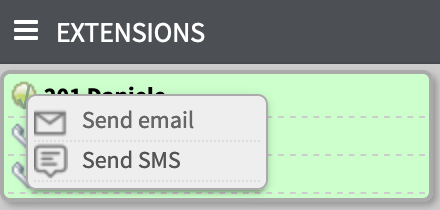
    In Panel Manager the list of buttons is complete and synchronized with the configuration of FreePBX. I tried to configure groups, permissions and templates. I tried to reinstall FOP2 by first deleting files, and database tables.

    I run the command
    /usr/local/fop2/autoconfig-buttons.sh
    which displays all extensions, queues and trunks. Also in Panel Manager, the PLUG-IN and SETTINGS icons on the left sometimes don't appear ...

    And
    php /var/www/html/fop2/admin/update_conf.php 1

    Before purchasing the license, I wish everything worked ...

    Thanks, Daniele.
    1 Reply Last reply
    0
    • K
      K
      kiziuk
      wrote on last edited by
      #2

      The free version has a limitation up to 15 buttons. Disable some extensions in Panel Manager -> Buttons and see if other buttons appear.

      1 Reply Last reply
      0
      • A
        A
        assistenza
        wrote on last edited by
        #3

        Thanks, you're right! Too many extensions and queues cause problems if you don't have a license.
        Daniele

        1 Reply Last reply
        0

        Hello! It looks like you're interested in this conversation, but you don't have an account yet.

        Getting fed up of having to scroll through the same posts each visit? When you register for an account, you'll always come back to exactly where you were before, and choose to be notified of new replies (either via email, or push notification). You'll also be able to save bookmarks and upvote posts to show your appreciation to other community members.

        With your input, this post could be even better 💗

        Register Login
        Reply
        • Reply as topic
        Log in to reply
        • Oldest to Newest
        • Newest to Oldest
        • Most Votes


        • Login

        • Don't have an account? Register

        • Login or register to search.
        Powered by NodeBB Contributors
        • First post
          Last post
        0
        • Categories
        • Recent
        • Tags
        • Popular
        • World
        • Users
        • Groups