
DAHDI and ZAP extension monitoring help.
-
I am having some trouble showing any monitoring whatsoever.
I started reading some posts but I didn't get much further than a DAHDI truck parameter.
I am using the latest and greatest stable version of FreePBX (everything updated, configured and working) followed but and installation of the latest FOP2 server and module.
You mentioned,
If its DAHDI, you must configure the channel number range in the fop2 buttons page in freepbx fop2admin, like 1-30
.I set up my **DAHDI **trunks with the channel it was assigned. This indicated to me that I have to set up my ZAP channels (extensions) to something similar. Is this correct? I cannot find much on anything other than SIP.
Thanks!
-
Not sure if I understand exactly what you did with your DAHDI setup, but if you want to monitor a dahdi trunk you must go to the FOP2 BUTTONS page in Fop2Admin freepbx module, in that button list, down the bottom, you will see the Trunks sections, and the DAHDI/Zap trunks, and there you have a field where you must complete the channel range, like: "1-30"
-
Oh ok. I'll take another look.
What about channels? None of my zap channels (extensions) show any activity either. Nothing seems to be monitored. I'm sure I'm missing a simple setting but if you could point me in the right direction, that would be great!
In a perfect world, I could see if someone is on a certain phone at any time.
Thanks!
PS: Fantastic project! Keep up the good work.
-
NOTHING SHOWS? or just Dahdi? Do you have sip extensions? Do you see any activity for them? IF nothing shows, you most probably have problems with your asterisk manager settings.
/usr/local/fop2/fop2_server --test
That will test the manager connection. Also be sure you have all permissions in /etc/asterisk/manager.conf
-
NOTHING SHOWS? or just Dahdi? Do you have sip extensions? Do you see any activity for them? IF nothing shows, you most probably have problems with your asterisk manager settings.
/usr/local/fop2/fop2_server --test
That will test the manager connection. Also be sure you have all permissions in /etc/asterisk/manager.conf
I see buttons of my extensions but no activity at all. I do not have any sip extensions. I do have some fake extensions that I am using for forwarding to cell phones using follow me but they are simple.
Here is my manager.conf (user/pass changed).
[general]
enabled = yes
port = 5038
bindaddr = 0.0.0.0
displayconnects=no ;only effects 1.6+[admin]
secret = ******
deny=0.0.0.0/0.0.0.0
permit=127.0.0.1/255.255.255.0
read = system,call,log,verbose,command,agent,user,config,command,dtmf,reporting,cdr,dialplan,originate
write = system,call,log,verbose,command,agent,user,config,command,dtmf,reporting,cdr,dialplan,originate#include manager_additional.conf
#include manager_custom.confThere is nothing in manager_additional.conf and manager_custom.conf.
For u/p comparison, here is my fop2.cfg
[general]
; AMI definitions
manager_host=0.0.0.0
manager_port=5038
manager_user=admin
manager_secret=****
;event_mask=agent,call,command,system,user,dialplan; Daemon definitios
;listen_port = 4445
;restrict_host = http://www.asternic.org
;web_dir = /var/www/html/operator/fop2; Global Config
poll_interval = 86400
poll_voicemail = 1
monitor_ipaddress = 0; Force blind transfer on asterisk 1.6
blind_transfer = 1; Force supervised transfer on asterisk 1.4
; requires the atxfer manager backport patch
; supervised_transfer = 1; Force delimiter for asterisk applications
; force_parameter_delimiter = ","; When adding or removing members to a queue, fop2 will default to
; AddQueueMember/RemoveQueueMember commands. If you set use_agentlogin
; to 1, together with the QueueChannel in a button definition set to
; an Agent number it will use AgentCallbackLogin and Agentlogoff instead.
;
; use_agentlogin = 0; Master Password that overrides any individual one
;master_key = 5678; Options to send to chan_spy when doing a Listen action
; This global setting is overriden by the individual button
; spyoptions directive if set (in the button config).
; Asterisk 1.6.1 or higher has the option "d" that lets you
; switch spying modes using the keypad:
;4 = spy mode
;5 = whisper mode
;6 = barge mode
spy_options="bq"; Options to send to chan_spy when doing a Whisper action
; In Asterisk 1.6.1 or higher you can use B to enable barge (speak
; to both channels on a call).
whisper_options = "w"; When you spy to an ongoing call, your spy session will end as
; soon as the conversation you are listening to finishes. If you
; rather keep the chan spy session open after the call end, uncomment
; the following line.
;persistent_spy=1; Filename to use when start monitoring, you can use ${UNIQUEID},
; ${ORIG_EXTENSION}, ${DEST_EXTENSION}
; and date formats %Y %m %d to construct the filename.
;
; Settings for modifying the recording filename
; Available variables are:
; ${UNIQUEID} = Unique Id of the call
; ${TIMESTAMP} = Unix Timestamp when the recording was initiated
; ${CLIDNUM} = Callerid or Dialed number for the active call
; ${CLIDNAME} = Callerid name for the active call
; ${DEST_EXTENSION} = Target extenstion being monitored
; ${ORIG_EXTENSION} = Extension/User that started the recording (not
; the other leg)
; ${MBOX} = Mailbox of the extension/user that started the
; recording
; ${FOP2CONTEXT} = FOP2 Panel Context
;
; Date variables:
; %Y 4 digits year
; %y 2 digits year
; %m 2 digits month
; %d 2 digits day
; %h 2 digits hour
; %i 2 digits minute
; %s 2 digits seconds; For elastix Monitoring Tab:
; monitor_filename=g${DEST_EXTENSION}-${UNIQUEID}; For fop2 recording interface
monitor_filename=/var/spool/asterisk/monitor/${ORIG_EXTENSION}${DEST_EXTENSION}%h%i%s_${UNIQUEID}
monitor_format=wav
monitor_mix=true; To enable the recording interface you must uncomment the following
; line, but also you might need to modify the script a little bit
; depending on the sox version you have installed.
;
;monitor_exec=/usr/local/fop2/recording_fop2.pl; You could specify your own script to be executed when the recording
; is finished. It will receive 3 parameters, the complete
; path and filename of the IN leg, the OUT leg and the final
; recording NAME. You should run soxmix in your script to join
; the recordings into one file.
;
; monitor_exec=/var/lib/asterisk/bin/postrecording-script.sh; FOP2 can fire notifications/popups when an extension or queue
; member receives a call. The default behaviour is to show a
; notification on state RINGING (notify_on_ringing=1).
;
; To customize notifications, you must uncomment the custom_popup
; function in checkdir.php you can replace that notification with
; a custom popup function to integrate with other web applications.
;
; For call centers you might need to perform a popup not on the
; RINGING state but when the call is CONNECTED to an agent. If you
; set in the queue configuration in queues.conf the option
; eventwhencalled=yes and then set here notify_on_connect=1,
; fop2 will send notifications on queue connected calls
; during AGENTCONNECT events. This will only work for inbound calls
; from a queue.
;
; notify_on_ringing = 1
; notify_on_connect = 1; Call pickup uses the pickupmark variable by default. In multi tenant
; systems this might lead to problems as you might end un picking up
; some other tenant call. In that case you might want to try to
; pickup the call by its context uncomenting the following line:
;
; no_pickupmark=1; If your asterisk version supports the pickupchan application it is
; much better to use this than the regular pickup application as it will
; be directed towards the channel and not the extension, makeing it
; more precise.
;
; use_pickupchan=1; Path to your voicemail directory
; For voicemail to work the fop2 server must run on the same server
; as asterisk, or your voicemail directory must be network mounted
voicemail_path=/var/spool/asterisk/voicemail; By default IM chats are not logged/saved. If you uncomment
; the following parameter, all chats will be stored on the chatlog
; table inside the fop2settings.db sqlite database.
;
; save_chat_log=1; Khomp GSM interface to send SMS messages
; If there is a card plugged, fop2 will auto discover it
; and use the first one available. If you want to change it
; to a fixed one, uncomemnt the folowing line and change the name
; to your liking
;
; khomp_gsm=Khomp/b0; --- SAMPLE GROUPS ---
; group=queues:QUEUE/100,QUEUE/101
; group=deptA:SIP/100,SIP/101,SIP/102
; --- END SAMPLE ---; --- SAMPLE USER LIST ---
; format: user= EXTENSION : SECRET : PERMISSIONS : GROUPS
; You can enumerate several permissions and groups separated by comma
; available permissions: 'all', 'dial', 'hangup', 'meetme', 'pickup',
; 'record', 'spy', 'transfer', 'whisper',
; 'queuemanager', 'queueagent', 'phonebook',
; 'chat', 'preferences', 'hangupself',
; 'recordself', 'voicemailadmin'
;
; user=620 all:queues
; user=621dial,transfer,pickup:deptA
; user=622all
; user=623meetme,pickup
; buttonfile=buttons.cfg
; ------ END SAMPLE ------; This line is NOT commented, it executes
; the autoconfig configuration for FreePBX
#exec autoconfig-users-freepbx.sh
-
Did you run
/usr/local/fop2/fop2_server --test
??
What is the output of one of your extension buttons when you run
/usr/local/fop2/autoconfig-buttons-freepbx.sh ?
Fop2 monitors based on channel names reported by asterisk, you can see the names by doing a "core show channels" in the asterisk cli while you have some calls up.
Those names must match the button configuration device (between brackets in the buttons.cfg file).
Best regards,
-
Oh sorry. Yes I ran /usr/local/fop2/fop2_server --test and got a result of "Connection to manager OK!"
When I ran /usr/local/fop2/autoconfig-buttons-freepbx.sh, I get:
[ZAP/1]
type=extension
extension=10
label=Kim-Man
mailbox=10@default
context=from-internal
queuecontext=from-internal
extenvoicemail=*10@default
rtmp=0
queuechannel=Local/10@from-internal/n|Penalty=0|MemberName=Kim-Man|StateInterface=ZAP/1
customastdb=CF/10[ZAP/2]
type=extension
extension=20
label=Darrell-Downstairs
mailbox=20@default
context=from-internal
queuecontext=from-internal
extenvoicemail=*20@default
rtmp=0
queuechannel=Local/20@from-internal/n|Penalty=0|MemberName=Darrell-Downstairs|StateInterface=ZAP/2
customastdb=CF/20[VIRTUAL/21]
type=extension
extension=21
label=Fred-Cell
context=from-internal
queuecontext=from-internal
rtmp=0
queuechannel=Local/21@from-internal/n|Penalty=0|MemberName=Fred-Cell
customastdb=CF/21[ZAP/3]
type=extension
extension=30
label=Jim-Downstairs
mailbox=30@default
context=from-internal
queuecontext=from-internal
extenvoicemail=*30@default
rtmp=0
queuechannel=Local/30@from-internal/n|Penalty=0|MemberName=Jim-Downstairs|StateInterface=ZAP/3
customastdb=CF/30[VIRTUAL/31]
type=extension
extension=31
label=Jim-Cell
context=from-internal
queuecontext=from-internal
rtmp=0
queuechannel=Local/31@from-internal/n|Penalty=0|MemberName=Jim-Cell
customastdb=CF/31[ZAP/4]
type=extension
extension=40
label=Dave-Shop-1
mailbox=40@default
context=from-internal
queuecontext=from-internal
extenvoicemail=*40@default
rtmp=0
queuechannel=Local/40@from-internal/n|Penalty=0|MemberName=Dave-Shop-1|StateInterface=ZAP/4
customastdb=CF/40[VIRTUAL/41]
type=extension
extension=41
label=Dave-Cell
context=from-internal
queuecontext=from-internal
rtmp=0
queuechannel=Local/41@from-internal/n|Penalty=0|MemberName=Dave-Cell
customastdb=CF/41[ZAP/5]
type=extension
extension=50
label=Ming
mailbox=50@default
context=from-internal
queuecontext=from-internal
extenvoicemail=*50@default
rtmp=0
queuechannel=Local/50@from-internal/n|Penalty=0|MemberName=Ming|StateInterface=ZAP/5
customastdb=CF/50[VIRTUAL/51]
type=extension
extension=51
label=Ming-Cell
context=from-internal
queuecontext=from-internal
rtmp=0
queuechannel=Local/51@from-internal/n|Penalty=0|MemberName=Ming-Cell
customastdb=CF/51[VIRTUAL/55]
type=extension
extension=55
label=Scott-Cell
context=from-internal
queuecontext=from-internal
rtmp=0
queuechannel=Local/55@from-internal/n|Penalty=0|MemberName=Scott-Cell
customastdb=CF/55[ZAP/8]
type=extension
extension=80
label=Shawn-Upstairs
mailbox=80@default
context=from-internal
queuecontext=from-internal
extenvoicemail=*80@default
rtmp=0
queuechannel=Local/80@from-internal/n|Penalty=0|MemberName=Shawn-Upstairs|StateInterface=ZAP/8
customastdb=CF/80[VIRTUAL/81]
type=extension
extension=81
label=Shawn-Cell
context=from-internal
queuecontext=from-internal
rtmp=0
queuechannel=Local/81@from-internal/n|Penalty=0|MemberName=Shawn-Cell
customastdb=CF/81[ZAP/9]
type=extension
extension=90
label=Darrell-Upstairs
mailbox=90@default
context=from-internal
queuecontext=from-internal
extenvoicemail=*90@default
rtmp=0
queuechannel=Local/90@from-internal/n|Penalty=0|MemberName=Darrell-Upstairs|StateInterface=ZAP/9
customastdb=CF/90[VIRTUAL/91]
type=extension
extension=91
label=Darrell-Cell
context=from-internal
queuecontext=from-internal
rtmp=0
queuechannel=Local/91@from-internal/n|Penalty=0|MemberName=Darrell-Cell
customastdb=CF/91[VIRTUAL/94]
type=extension
extension=94
label=Brian-Cell
context=from-internal
queuecontext=from-internal
rtmp=0
queuechannel=Local/94@from-internal/n|Penalty=0|MemberName=Brian-Cell
customastdb=CF/94[ZAP/10]
type=extension
extension=100
label=Conference-Upstairs
context=from-internal
queuecontext=from-internal
rtmp=0
queuechannel=Local/100@from-internal/n|Penalty=0|MemberName=Conference-Upstairs|StateInterface=ZAP/10
customastdb=CF/100[ZAP/11]
type=extension
extension=110
label=General-Area-Upstairs
context=from-internal
queuecontext=from-internal
rtmp=0
queuechannel=Local/110@from-internal/n|Penalty=0|MemberName=General-Area-Upstairs|StateInterface=ZAP/11
customastdb=CF/110[ZAP/12]
type=extension
extension=120
label=Shop-3
context=from-internal
queuecontext=from-internal
rtmp=0
queuechannel=Local/120@from-internal/n|Penalty=0|MemberName=Shop-3|StateInterface=ZAP/12
customastdb=CF/120[PARK/default]
type=park
extension=70
label=PARK/default
context=parkedcalls
queuecontext=from-internal
rtmp=0[RINGGROUP/600]
type=ringgroup
extension=600
label=Main Ring Group
context=ext-group
queuecontext=from-internal
rtmp=0[ZAP/23]
type=trunk
label=ZAP/23
queuecontext=from-internal
rtmp=0[ZAP/22]
type=trunk
label=ZAP/22
queuecontext=from-internal
rtmp=0[ZAP/21]
type=trunk
label=ZAP/21
queuecontext=from-internal
rtmp=0I'm sure I'm bloody close. It must be something simple by this point.
Thanks for your help so far.
-
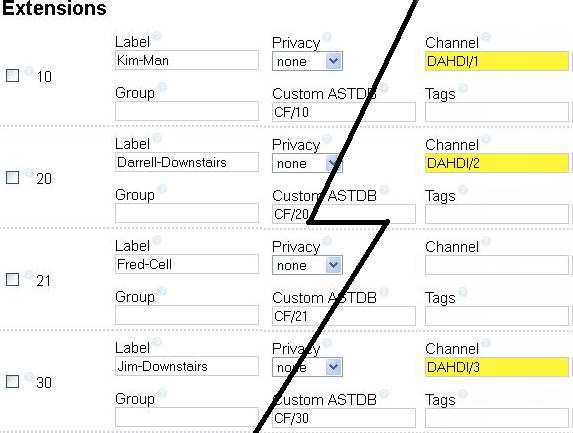
Ok, the misunderstanding is that you are using DAHDI extensions and I assumed you were talking about trunks.
As you see, the buttons are named Zap/X, but most probably Asterisk reports them as DAHDI/X, so what you need to do is go to the fop2 buttons page, and in the channel field (that you mentioned earlier), write:
DAHDI/2
DAHDI/3
etc..
matching the number you see on the channel name.
Best regards,
-
How exiting!
I set it up as shown below.
http://i419.photobucket.com/albums/pp280/Shandleyman/PBX/FOP2-001.jpg
Thanks again! Works like a charm!
I'm new but learning a lot. Thanks
Hello! It looks like you're interested in this conversation, but you don't have an account yet.
Getting fed up of having to scroll through the same posts each visit? When you register for an account, you'll always come back to exactly where you were before, and choose to be notified of new replies (either via email, or push notification). You'll also be able to save bookmarks and upvote posts to show your appreciation to other community members.
With your input, this post could be even better 💗
Register Login