
No options when clicking on Action Submenu
-
Greetings,
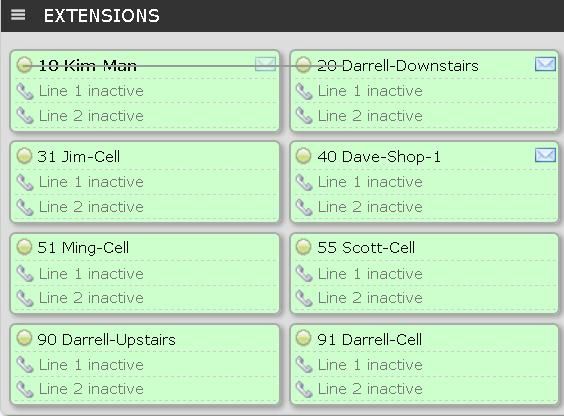
I see in most of the videos and instructions on how to use the FOP2 WebGUI, people are able to click the button beside an extension to get a dropdown box of options (i believe it's called the Action submenu).
All that I get is a line. Any ideas? Please see my screenshot where I clicked beside 10 Kim-Man:
http://i419.photobucket.com/albums/pp280/Shandleyman/PBX/FOP2-002.jpg
-
Action submenu will show if you are allowed to perform the actions listed in the menu:
- to send email you must configure an email in the fop2 buttons page in fop2 admin for your extensions
- for add/remove/pause from queue, you must see a queue button on screen, and you must have "all" or "queuemanager" fop2 permissions
- for chat, you must have the chat license
etc...
Best regards,
Hello! It looks like you're interested in this conversation, but you don't have an account yet.
Getting fed up of having to scroll through the same posts each visit? When you register for an account, you'll always come back to exactly where you were before, and choose to be notified of new replies (either via email, or push notification). You'll also be able to save bookmarks and upvote posts to show your appreciation to other community members.
With your input, this post could be even better 💗
Register Login