
Is it possible to customize/change the presence box items?
-
Hi FOP2-Community,
i am searching the web and the FOP2 forum and source files now for a longer time and it seems i'm too dumb to find what i need.
I want to adapt/change the existing items in the presence dropdown box of FOP2 (2.26 White label lic.). Reason: First not all are localized to german (it's a mix of english and german) and second our staff wants me to remove (or replace) existing labels we do not need with some we need. I get the impression they are hardcoded somewhere (maybe in the SWF?) or they are stored in the sqlite database?
So my question is:
- Where can i customize existing items from the dropdrown presence control in the FOP2 browser page and what do i need to change exactly.
- Do i need to change the english AND the german translation or just the german translation?
- Can i only replace existing items (meaning i am constrained to the amount of items that are already there) or can i add more (if we need another when all existing are already adapted) and remove some (if we need fewer options to not overwhelme the user with unneccesary things). If i can add and/or remove, what are all the places and things i need to change?
Thank you in advance for your help, patience and an early reply.
Greetings
JoTo -
-
Hi Nicholas,
thank you very much for your answer.
Hmmm, i'm a retard. I already found the presence.js file and noticed the presence entries. My mistake was, that i thought its only the color settings there. I haven't thought about you are using the array index keys as the text labels too. I thought there is another place where you reference this array keys with the colors to add somewhere else defined lables.

Now i understood that the array keys are the text labels as well. I changed them and all works fine now.
Thank you again for your effort.
Greetings
JoTo -
Glad you have it working. Actually, I was never totally happy with the presence option labels being the array keys. Because it is another place to configure localization, when ideally it should be all on one place only (and it can be confusing, you were bitten by that design choice I made early on).
The thing is that in this way it is also very flexible, as you can define as many options as you want. If you have an idea on how to move the localization/translation somewhere else without losing flexibility please let me know!
best regards,
-
Hi Nicolas,
i don't think you can't get rid of the "edit in 2 places" concept without losing the flexibility of having an arbitrary amount of entries. You have to define the english defaults array entries and then the translation in the lang.js file. So i agree with you, not perfect, but unavoidable IMO.
I prefer to have the flexibility though. So don't change anything unless you find the ultimate solution.
Thanks again for you nice contact and responsiveness.
Greetings
JoTo -
-
I've tried adding some entries to presence.js:
presence['Washroom'] = '#2da4ff';
presence['Chat'] = '#ddf74d';
presence['Notes'] = '#ff8de0';and to lang_en.js:
lang['Washroom'] = 'Washroom';
lang['Chat'] = 'Chat';
lang['Notes'] = 'Notes';Yet these entries aren't appearing in the dropdown. If I edit an existing entry, that change is reflected. Any ideas? I've tried restarting fop, but doesn't have any effect.
Also, any guidance on the best way to remove the "Other" option?
-
Reviving this old post to mention how to do things using recent FOP2 versions (>2.31.0):
You can disable the Other presence option by login into the FOP2 Manager, selecting Settings and enabling disablePresenceOther
As for adding/removing custom options, also in Settings, in the last page click on presenceOptions and you will be able to add/edit/remove entries: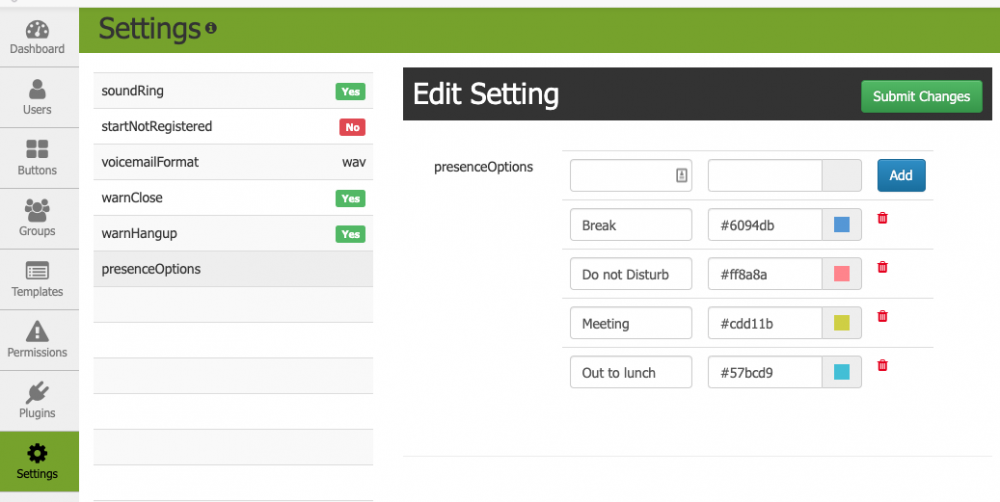

Hello! It looks like you're interested in this conversation, but you don't have an account yet.
Getting fed up of having to scroll through the same posts each visit? When you register for an account, you'll always come back to exactly where you were before, and choose to be notified of new replies (either via email, or push notification). You'll also be able to save bookmarks and upvote posts to show your appreciation to other community members.
With your input, this post could be even better 💗
Register Login