
Caller ID Issues W/PJSIP Extensions
-
I am experiencing an issue with PJSIP extensions and the FOP2 flash operator panel and was wondering if anyone can shed some light on it. The problem is that the PJSIP extensions do not show CID information of the call an extension is currently on, or of any calls that are ringing any of those extensions. When the call is answered, the extension on the panel does turn orange indicating they are on a call (see screenshot below) but with no CID info.
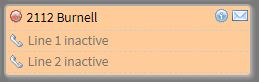
If I perform a “service fop2 restart” in SSH, it will start working but only for a few hours before the PJSIP extension will again show no CID info. I do not have this issue with CHAN_SIP extensions. All of these PJSIP extensions were setup originally as CHAN_SIP but then converted to PJSIP.
It seems it has something to do with extensions that have a desktop phone registered (in this case all Yealink T46G/S models). If I unplug the desktop phones and only have softphones registered to an extension, it will be fine.
Has anyone else had this issue? If so, have you found a fix?
-
YES - this is the biggest issue we face when deploying FOP2 to clients. I find a service stop and start fixes it, for a while. I hope that Nicolás can find a real fix!!
-
We have the same issue. From what I can tell is my first device to register is a 16 line Yealink T48S and that uses up the first 16 lines, and second device starts at line 17 which is not displayed. When you do a restart the first registered device shows correctly but the second device will only make the extension shows active but will not display line data. If it would only display active lines when set to Dynamic Line Display it would fix the issue.
-
I found a work around for this issue. Using the admin panel go to settings, page 2 and look for the option showlines set this value higher than the number of lines of first registered device. I set it to 25.
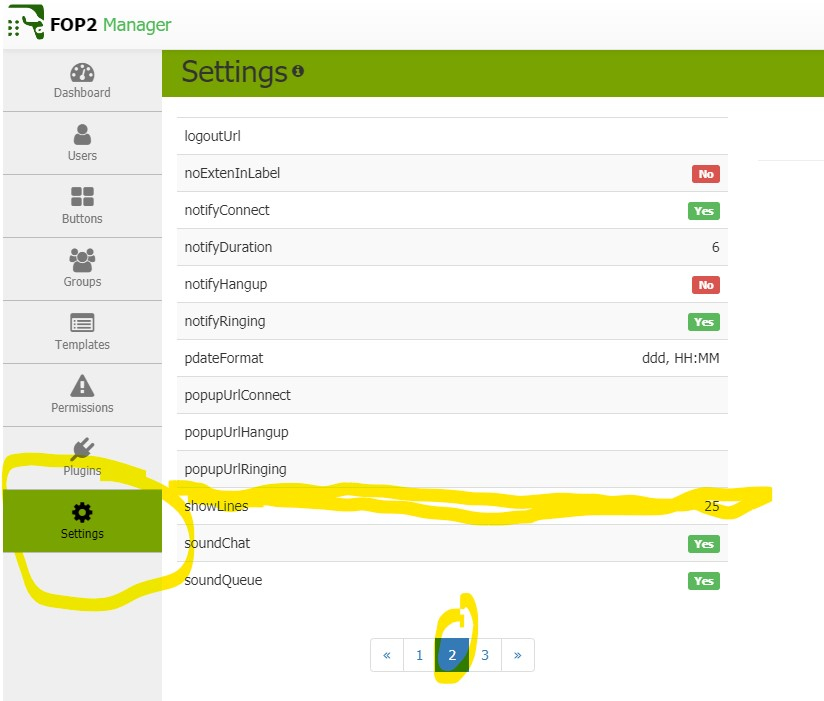
Then under the users preferences turn Dynamic Line Display (On) so you don't have all 25 lines displaying per extension.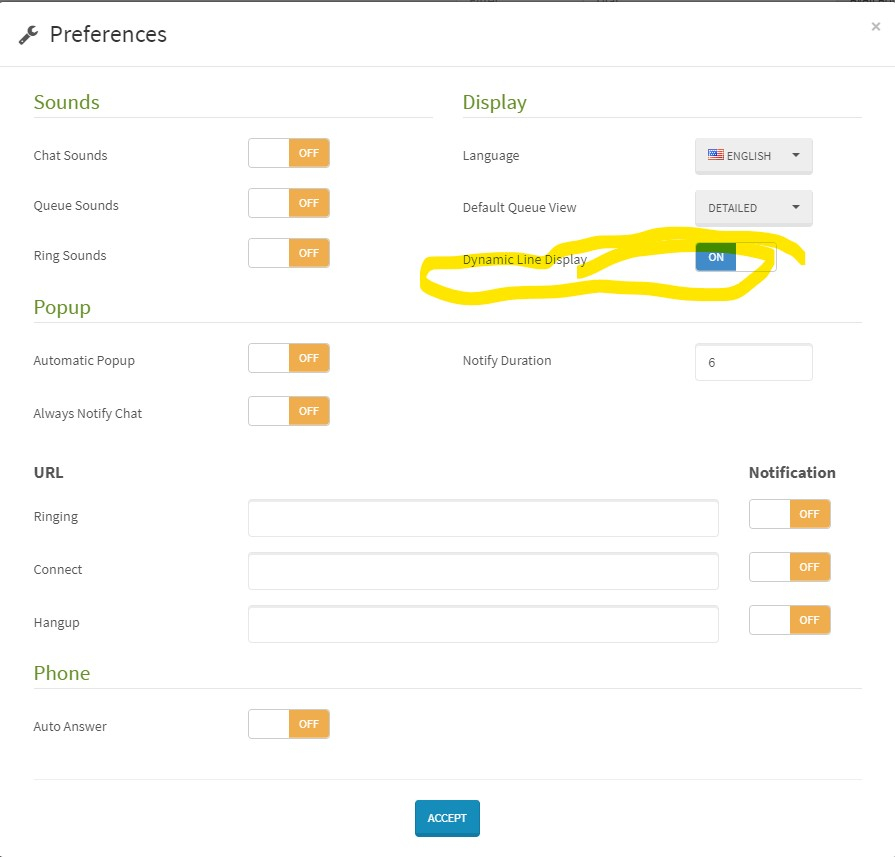
-
The issue has to do with call "slots" not being freed. So new call activity is accounted for on line 3, line 4, line 5, and so on. As you do not have that many lines on display, you do not see the information.
This slot not being freed might happen if you get a queue call and transfer it out, I do not recall the exact details, but was some specific interaction with calls that resulted in out of order AMI Events. I did some modifications on the latest FOP2 version related to this, not sure what version you are on, I suggest upgrade to the latest and see if you still have this issue.
If you do, then the proper way for us to work on a fix would be to determine when a call slot is not freed, what actions on the PBX lead to that state, so we can track the AMI event log and see if we can fix a bug if there is any, or try some kind of workaround if AMI events are out of order or incorrect.
http://members.asternic.biz/knowledge_base/how-to-debug-fop2
It is important to single out the specific actions that lead to the issue, otherwise analysing logs is kind of impossible as we won't be able to single out the events that cause the issue.
Hello! It looks like you're interested in this conversation, but you don't have an account yet.
Getting fed up of having to scroll through the same posts each visit? When you register for an account, you'll always come back to exactly where you were before, and choose to be notified of new replies (either via email, or push notification). You'll also be able to save bookmarks and upvote posts to show your appreciation to other community members.
With your input, this post could be even better 💗
Register Login