
Call recording name format incompatible with FreePBX 15
-
When I record a call within FOP2, it does correctly record the call and write the filename to the CDR record. Unfortunately, FreePBX 15 requires that the seperator be a
-and not a_now. Additionally, the call needs a field added prior the to the name ( i usedfop2in my manual test) and it needs the date. Once fixed, like this, the recording shows up in the CDR search as well as the UCP.
Original filename:219_219_111806_1638551871.156513_GENERAL.wav
Working filename:fop2-219-219-20211203-111806-1638551871.156513-GENERAL.wav
The issue is how the CDR (and UCP as it worked but I haven't checked the code) finds the file.
https://github.com/FreePBX/cdr/blob/2969c0781e0322af94048380b6f3adde18f23621/Cdr.class.php#L489
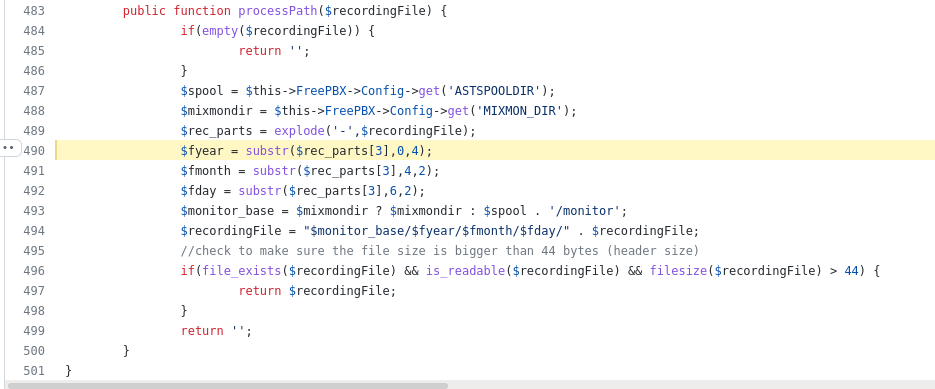
-
You can edit the monitor_filename setting in /usr/local/fop2/fop2.cfg and change the name/format to whatever will suite your needs, default is:
monitor_filename=/var/spool/asterisk/monitor/${ORIG_EXTENSION}_${DEST_EXTENSION}_%h%i%s_${UNIQUEID}_${FOP2CONTEXT}Maybe changing it to:
monitor_filename=/var/spool/asterisk/monitor/fop2-${ORIG_EXTENSION}-${DEST_EXTENSION}-%h%i%s-${UNIQUEID}-${FOP2CONTEXT}will do the trick... Remember that whenever you modify fop2.cfg, you must restart FOP2 in order for the changes to take effect:
systemctl restart fop2Best regards,
-
I can and will change this, thanks. But I think this also needs to be default if you want things to work with FreePBX still.
-
-
Of course not everyone uses FreePBX. If this setting is not one that can have a good default based on deployed system, then maybe make a help note someplace so admins can know where to set this.
-
This monitor_filename change in fop2.cfg has a consequence for the recordings_fop2.pl script and/or the data placed in the mysql table. The content for fop2recordings.ownerextension ends up a 20 character excerpt of the filename while the field foprecordings.context is left empty. In the recordings.php grid, the "Owner Extension" column shows a 20 character excerpt of the filename while the Destination Extension column is empty.
I changed my fop2.cfg to make the filename for the recording match the one in the example picture above, which has a date field added between dest_extension and the time.
; For fop2 recording interface
; original modified 10-Oct-22 by Mike Wilson
; monitor_filename=/var/spool/asterisk/monitor/fop2-${ORIG_EXTENSION}-${DEST_EXTENSION}-%h%i%s-${UNIQUEID}-${FOP2CONTEXT}
monitor_filename=/var/spool/asterisk/monitor/fop2-${ORIG_EXTENSION}-${CLIDNUM}-%Y%m%d-%h%i%s-${UNIQUEID}-${FOP2CONTEXT}
monitor_format=wav
monitor_mix=trueThe setting for ownerextension becomes much longer. Is that updated in the newest version? I think something like this may work but I have not used Perl much:
my $fnm = $OUT;
my $basename = basename($OUT);
##my ( $exten, $targetexten, $fullmbox, $uniqueid, $context ) = split( //, $basename );_
my ( $rectype, $exten, $targetexten, $recday, $fullmbox, $uniqueid, $context ) = split( /[_-]/, $basename );I found the issue by examining the mysql table fop2records. What should be changed in the script in order to make the ownerextension field get filled out with the correct extension, and the context field get filled out?
-
-
I verified the files are updated in version 2.31.33 but are not in 2.31.32 so apparently my "fix" repeats the changes.
Of interest to anyone running fop2 on another server (without asterisk installed), like us:
The scripts need to be on the server, so that needs to be added here:
/src/local/fop2/recordings_fop2.pl
The owner and group of the file can be root, but the directory needs group set to asterisk.
drwxrwxr-x 4 root asterisk 4096 Sep 16 23:04 fop2
For the NFS share to allow FOP2 access to newly created recordings, I created a group on the FOP2 server for asterisk with the same gid as that group on the pbx. Then, added apache user to that group.
Example, asterisk gid on the pbx is 498 so on the fop2 server:
groupadd -g 498 asterisk
usermod -a -G asterisk apache
Hello! It looks like you're interested in this conversation, but you don't have an account yet.
Getting fed up of having to scroll through the same posts each visit? When you register for an account, you'll always come back to exactly where you were before, and choose to be notified of new replies (either via email, or push notification). You'll also be able to save bookmarks and upvote posts to show your appreciation to other community members.
With your input, this post could be even better 💗
Register Login