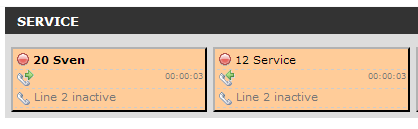
Still having this problem...
@Admin, did you take a short look at the screenshots? Is this normal behaviour?
B
Birliban
@Birliban
Posts
-
Hide the Number that is being called -
Hide the Number that is being calledI just checked it out with 1.12 version.
Same problem...Maybe my description wasnt that good.
When someony on the panel is starting a call, then the number that is dialed is displayed like ->'001456543@123.2.4.5'
if the called number picks up, this number disappears and you see the line as busy.On making an internal call, you can see the source extension dialing the destination ext., The number being dialed is only displayed at the source, not at the destination button. If the destination pics up, the number at the source button disappears.
I did some screenshots:
Dialing internal from extension 20 to extension 12. You can see the extension that is being dialed: 'fon12':
http://gyazo.com/4ab096b24e205ec9b55a1d4b03597d3e.png
After Extension 12 has picked up, the clid is not displayed anymore:
http://gyazo.com/dc9deff2d56a3ec0b8dfd6566fc1e1ab.png
Same problem on external numbers, then the number being displays while dialing looks like this:
http://gyazo.com/16b16663ce3587db4607688debf3809e.png
So, is this beaviour wanted or can this be configured somehow.
Thanks!
-
Hide the Number that is being calledYou can see the number just as long as the phone call is not established. (While ringing). Can you reproduce this?
-
Hide the Number that is being calledNo idea on that?
I can hide line 1, but then i do not see when a call is incoming on another extension.
I just need to hide the number bien dialed for privacy reasons... -
Hide the Number that is being calledPrivacy CLID works, but when a extension is starting a call, the dialed number is displayed as long as the receiver didn't answer the call. How to avoid this, or how to hide the Number that is dialed.
Thanks.
-
Blink on ringingAny news on making the whole button blink or changing ist color when ringing?
I really would be thankful of this feature, because the small blinking icon is hard to find
-
language problem of line statusThats it. Thanks!
-
clid doesn't work on additional panel context buttonfileIs there any solution for this?
At least I want that every logged in user, can see his CLID but no CLID of the other boxes.
To solve this, i have to make one context per user. But with the problem I wrote before, it doesn't work.Need any advice please.
-
language problem of line statusI changed the lang['line_1_inactive'] = "Line 1 inactive";
to
lang['line_1_inactive'] = Line free";On first login to fop2 it is displayed correctly, but after any line had a call, there is 'Line 1 inactive' written again.
Bug or feature?
Can i change this somehow? -
clid doesn't work on additional panel context buttonfileI have defined a new panel context for different users. There is a different buttonfile in the context and in this
buttonfile the privacy=clid option does not work on any of the buttons configured.I have 9 Buttons defined, each Button with different extensions, but following Options:
[SIP/fon11]
type=extension
extension=11
context=from-internal
label=Mark
mailbox=11@default
extenvoicemail=*11@from-internal
group=Team
privacy=clidThe incoming and outgoing number is still displayed.
If i set privacy=clid in the buttonfile that is configured under the [general] context, it works and no number is displayed.
How to fix this? -
HowTo Remove Toolbar (Minimal installation)?Oh, i see, i forgot to set the context=mycontext in the url call
-
HowTo Remove Toolbar (Minimal installation)?You do not need to put other parameters in the panel context, with user and buttonfile you are right.
Best regards,Thank you, but it doesn't seem to work. I placed a new context at the end of fop2.cfg like this:
[mycontext]
user=15 pickup,dial,meetme
buttonfile=buttons_user.cfgBut the login with this user doesn't work. (Login popup appears again)
-
HowTo Remove Toolbar (Minimal installation)?Thanks for your answer.
Is it possible to put just
*
[mycontext]
user=xxxx:yyyy:zzzz
buttonfile=mycontext-buttons.cfg*into a context? Or do you have to put all the other parameters into it (e.g. manager_host= etc....) too
Last modification question. I need to change the title in browser. (<title> tag). Is there any way, or is it forbidde due to copyright reasons?
-
HowTo Remove Toolbar (Minimal installation)?Great! Thanks for that fast answer!
Another thing (offtopic) How to give different users different buttonfile configs?
In General section in fop2.cfg there is only one buttonfile to set. -
HowTo Remove Toolbar (Minimal installation)?Hi,
I installed fop2 and it works, but i need it just for watching the extension status (Only 5 Boxes).
So, how to remove the upper Tool-Bar?
And is there a way to remove the 2.nd Line in a Box (I don't have a 2nd Line to monitor)?Thanks a lot.
Birlie