Skip to content
  • Categories
  • Recent
  • Tags
  • Popular
  • World
  • Users
  • Groups
Skins
  • Light
  • Brite
  • Cerulean
  • Cosmo
  • Flatly
  • Journal
  • Litera
  • Lumen
  • Lux
  • Materia
  • Minty
  • Morph
  • Pulse
  • Sandstone
  • Simplex
  • Sketchy
  • Spacelab
  • United
  • Yeti
  • Zephyr
  • Dark
  • Cyborg
  • Darkly
  • Quartz
  • Slate
  • Solar
  • Superhero
  • Vapor

  • Default (No Skin)
  • No Skin
Collapse
Brand Logo

FOP2 Community Forum

J

jzimmer

@jzimmer
Unfollow Follow
About
Posts
4
Topics
1
Shares
0
Groups
0
Followers
0
Following
0

Posts

Recent Best Controversial

  • Transferring FOP2 configuration
    J jzimmer
    Support

    Updated a FreePBX 15 / Asterisk 18.26.4 server to a new FreePBX 17 / Asterisk 22.5.2 setup. I installed a new FOP2 license and then used the instructions at https://www.asternic.net/docs/knowledgebase/migrate_fop2_config/ to move the FOP2 configuration to the new server. When we run the import command on the new server, we get an error.

    Importing groups
    PHP Fatal error: Uncaught mysqli_sql_exception: Field 'context_id' doesn't have a default value in /var/www/html/fop2/lib/dblib.php:96
    Stack trace:
    #0 /var/www/html/fop2/lib/dblib.php(96): mysqli_query()
    #1 /usr/src/fop2/server/import_fop2_configs.php(107): dbcon->consulta()
    #2 /usr/src/fop2/server/import_fop2_configs.php(385): import_groups()
    #3 /usr/src/fop2/server/import_fop2_configs.php(21): main()
    #4 {main}
    thrown in /var/www/html/fop2/lib/dblib.php on line 96

    Any suggestions on getting the config import to work, or do we need to rebuild the configs from the GUI?
  • Caller ID Issues W/PJSIP Extensions
    J jzimmer
    Support

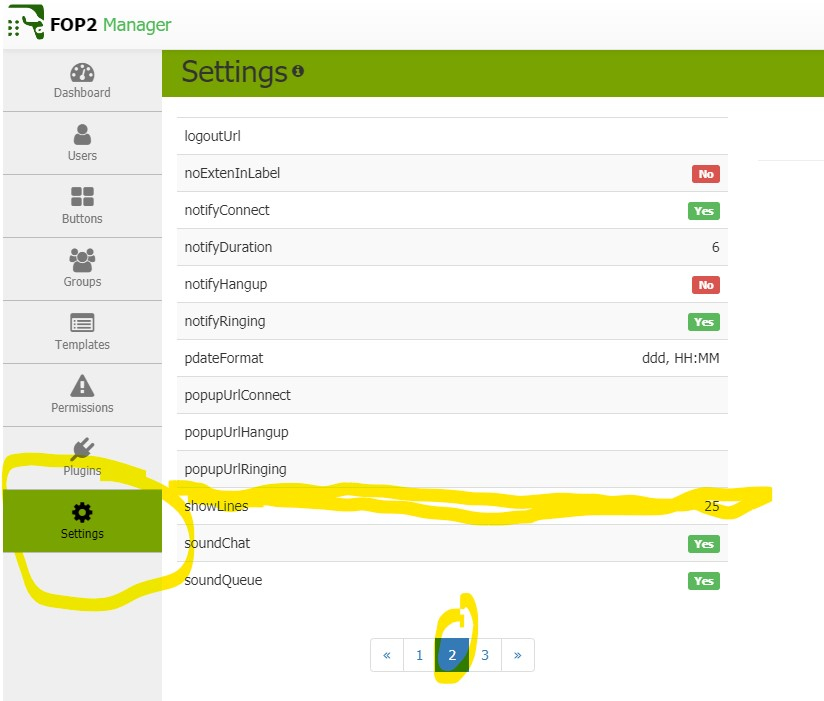
    I found a work around for this issue. Using the admin panel go to settings, page 2 and look for the option showlines set this value higher than the number of lines of first registered device. I set it to 25.
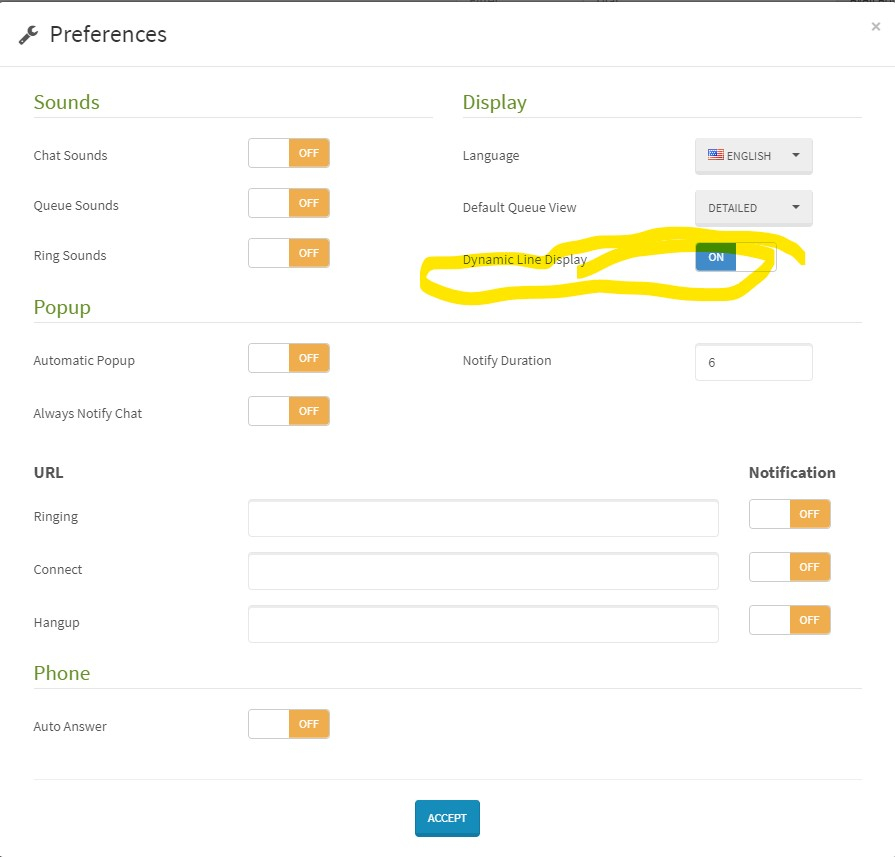
    Then under the users preferences turn Dynamic Line Display (On) so you don't have all 25 lines displaying per extension.


  • I presence icon - when a green ball is not just a ball?
    J jzimmer
    Support

    Do these users have more than 1 device registered via pjsip? If they have 2 devices the second one to register will not show detail on the call but they used will show active. If they use the first registered device it will work fine.

    Also I from what I have found the user that is signed into FOP2 is the one that has the check make in the presents button.


  • Caller ID Issues W/PJSIP Extensions
    J jzimmer
    Support

    We have the same issue. From what I can tell is my first device to register is a 16 line Yealink T48S and that uses up the first 16 lines, and second device starts at line 17 which is not displayed. When you do a restart the first registered device shows correctly but the second device will only make the extension shows active but will not display line data. If it would only display active lines when set to Dynamic Line Display it would fix the issue.

  • Login

  • Don't have an account? Register

  • Login or register to search.
Powered by NodeBB Contributors
  • First post
    Last post
0
  • Categories
  • Recent
  • Tags
  • Popular
  • World
  • Users
  • Groups