Skip to content
  • Categories
  • Recent
  • Tags
  • Popular
  • World
  • Users
  • Groups
Skins
  • Light
  • Brite
  • Cerulean
  • Cosmo
  • Flatly
  • Journal
  • Litera
  • Lumen
  • Lux
  • Materia
  • Minty
  • Morph
  • Pulse
  • Sandstone
  • Simplex
  • Sketchy
  • Spacelab
  • United
  • Yeti
  • Zephyr
  • Dark
  • Cyborg
  • Darkly
  • Quartz
  • Slate
  • Solar
  • Superhero
  • Vapor

  • Default (No Skin)
  • No Skin
Collapse
Brand Logo

FOP2 Community Forum

R

rhartmann

@rhartmann
Unfollow Follow
About
Posts
19
Topics
12
Shares
0
Groups
0
Followers
0
Following
0

Posts

Recent Best Controversial

  • Voicemail Play button
    R rhartmann
    Support

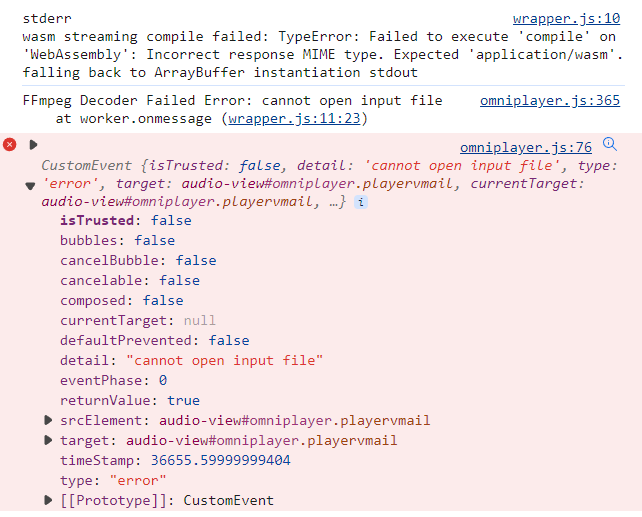
    It looks like there is a session variable not being set
    If I comment out the following Session Element checks in download.php
    if(!isset($_SESSION[MYAP]['vpath'])) { die("no way"); }
    and if i remove the vpath check in the following if statement
    if(!stristr($_SESSION[MYAP]['vfile'],$_SESSION[MYAP]['vpath']) && !stristr($_SESSION[MYAP]['vfile'],'/var/spool/asterisk/monitor/'))

    Then I can Play and download the Voicemail.

    I am unable to determine where this session variable is being set as it is not a configurable argument in any files in the following directories:
    /usr/local/fop2
    /var/www/html/fop2

    Any assistance on how to get this variable vpath defined would be very helpful
    ~ron


  • Voicemail Play button
    R rhartmann
    Support


  • Voicemail Play button
    R rhartmann
    Support

    Good Day, We have migrated from an older OS and Slightly Older FOP2 to the Latest version on new OS.
    We have everything working Except for being able to Actually Listen to and download a message.
    The Messages all pop up into the Folder View
    The Date, CallerID, Duration are all correct.
    Even the custom Tooltip feature that Nicolas created for us populates on the screen. This tells me that the Operator Panel can read the msg0000.txt file (otherwise the tooltip would not populate). Leaving me to think that it is not a permissions issue.
    Any help in what I may be overlooking would be greatly appreciated.


  • showLines
    R rhartmann
    Support

    I noticed in the newest version of FOP2 that the
    ShowLines has been moved out of the js/presence.js file and is moved to the manager gui

    Is there ANY way to add this into the button config file? we are running a vanilla asterisk and need to figure a way manipulate this on a Context by Context basis

    example http://1.1.1.1/fop2?context=tenant1 wants to have 1 showLines
    whereas http://1.1.1.1/fop2?context=tenant2 wants to have 3 showLines

    ~ron


  • FOP2Callbacks.pm multiple servers
    R rhartmann
    Support

    We have FOP2 connected to multiple asterisk manager interfaces
    Is there a way that we can use the FOP2Callbacks.pm and when it sees an event on Server 1, that we can instruct it to send an action to Server 2

    Example:

    A user logs into a queue on Server 1 and we want to issue a DevState command to server 2

    Here is an example FOP2Callbacks.pm which works perfectly when we have a single server.
    The user logs into a queue and we set the DevState on the server.

    What I need to do now is

    1. see the user logged into the queue
    2. determine which server saw the event
    3. send the DEVSTATE action to the other server

    here is an example of my FOP2Callback.pm

    sub amiCommand {
    
        # Received an event from Asterisk Manager Interface
    
        $command  = shift;
    
    #We see this come in on the AMI
    #How do we know which server this came from?
    #is there a variable that tells us the Asterisk Server that the AMI event came in on
    
        if( ($command eq "QueueMemberAdded") {
    
            %event = @_;
            my $return = "";
            my @allreturn = ();
    
                my $tiempo = time();
                $tiempo = $tiempo + 30;
                my $uniid  = $event{Uniqueid};
                my $queue  = $event{Queue};
                my $member  = $event{Location};
            
               #Can we define which SERVER to send this ACTION to
               #For example if this ABOVE "QueueMemberAdded" came from server A we want to post the following ACTION to SERVER B
               #How do we instruct the system to send the Action to a specific server
    
                $return = "Action: DevState\r\n";
                $return .= "DevState: ".$member.$queue."\r\n";
                $return .= "Value: 2\r\n";
                $return .= "\r\n";
    
                push @allreturn, $return;
                return @allreturn;
            }
    

    Thanks for any insight.

    ~ron


  • browser plugin 1.0.3 arguments
    R rhartmann
    Support

    Does anyone know of a way to pass the user id (the user name that was used to login to fop2) as an option on the initial URL as defined in the browser.ini.

    Something like

    initial_url = "https://MYSERVER/dashboard.php?user=1234"
    

    where 1234 is who is logged into the fop2

    If this is not possible, is there a place in the browser.js where a lookup could be performed to determine the logged in user and append it to the initial_url

    ~ron


  • checkdir.php
    R rhartmann
    Support

    I am having an issue getting the checkdir.php to pop up a window on connect.

    function custom_popup($ALLVAR) {
    
        // For Asternic Tag Call
        if($ALLVAR['poptype']=="ringing") {
    
            // RINGING NOTIFICATION
    
        } else {
    
            // AGENT CONNECT NOTIFICATION
    
            $clidnum   = $ALLVAR['clidnum'];
            $clidname  = $ALLVAR['clidname'];
            $fromqueue = $ALLVAR['fromqueue'];
            $exten     = $ALLVAR['exten'];
            $clidname = base64_decode($ALLVAR['clidname']);
            $clidnum  = base64_decode($ALLVAR['clidnum']);
            file_put_contents('/tmp/popup.txt', print_r($ALLVAR, true));
    
            header("Content-type: text/javascript");
            echo "window.open('http://192.168.1.1/popup.php?callerid=$clidnum&name=$clidname&queue=$fromqueue&agent=$exten')";
    
        }
    
        return 0;   // We do not want regular notifications
    }
    

    I am getting the debug contents in my /tmp/popup.txt

    Array
    (
        [poptype] => connect
        [clidnum] => MTUxMzMyODg0MzY=
        [clidname] => TnVyc2U6Q2VsbCBQaG9uZSAgIE9I
        [exten] => 2004
        [fromqueue] => Nurse 302
        [UNIQUEID] => 1479837388.2057
    )
    

    NOTE: [fromqueue] is showing the Queue's LABEL (as defined in the button config) , is there a way to get the Queue's Extension instead

    [QUEUE/302]
    type=queue
    Label=Nurse 302
    Extension=302
    context=from-support-srvcs
    

    NOTE: that the cidname and num have not been decoded as they are a print out from the $ALLVAR[] array

    I was hoping that this would pop up in my minibrowser plugin like when i add the popup url to the preferences section.

    http://192.168.1.1/popup.php?callerid=#{CLIDNUM}&callername=#{CLIDNAME}&UNIQUEID=#{UNIQUEID}&QUEUE=#{FROMQUEUE}&AGENT=#{EXTEN}
    

    I switched from adding the info in the fop panel preferences URL POPUP because I am unable to get the Extension number that took the call to be passed and i need to be able to pass that to my popup.php

    here is the output i am getting when using the popupurl in preferences
    Array
    (
    [callerid] => 18885551212
    [callername] => Nurse:Cell Phone OH
    [UNIQUEID] => 1479837733.2063
    [QUEUE] => Nurse 302
    [AGENT] => undefined
    )

    As you can see in this example there is no EXTEN variable getting saved.

    Not sure where to go from here debug wise.

    ~ron


  • PopUp on Connect
    R rhartmann
    Support

    Basically I am trying to see what even block FOP is using to gather the Variables that it sends to the browser.

    I have Found AgentConnect, but I suspect that there are other blocks.

    ~ron


  • PopUp on Connect
    R rhartmann
    Support

    I have the Popup working for Agents when they are connected to a call.

    I am trying to figure out why I am not able to see the #{EXTEN} or #{HOLDTIME} variables.

    My Popup URL is

    http://myserver/popup.php?callerid=#{CLIDNUM}&callername=#{CLIDNAME}&UNIQUEID=#{UNIQUEID}&QUEUE=#{FROMQUEUE}&AGENT=#{EXTEN}&HOLD=#{HOLDTIME}
    

    My Output is for $_GET variables is

    Array
    (
        [callerid] => 18885551212
        [callername] => Nurse:Walton      
        [UNIQUEID] => 1479501189.1594
        [QUEUE] => Nurse 302
        [AGENT] => undefined
        [HOLD] => undefined
    )
    

    Can anyone provide me what Debug level i should use and what to search for so i can see what variables are available to be sent to the POPup

    ~ron


  • browser-1.0.3 plugin
    R rhartmann
    Support

    Just like you stated 🙂

    Added the permissions and all is well and functional.

    THX


  • browser-1.0.3 plugin
    R rhartmann
    Support

    I am trying to get the browser plugin to show up on my panel (I have left everything defaulted except the browser.ini

    The other plugins are working as expected busycounter, queuecounter 🙂 I just see nothing regarding browser plugin

    I have added the plugin definition like all my other plugins to the fop2.cfg

    plugin=browser:/var/www/html/fop2/admin/plugins/browser
    

    I have the permission in the user settings

    user=1001:1234:dial,hangupself,transfer,voicemail,preferences::browser,busycounter,queuecounter
    

    browser.ini

    initial_url = "http://help.websiteos.com/websiteos/example_of_a_simple_html_page.htm"
    show_controls = 1
    

    My understanding is that when user 1001 logs in they would see a mini browser embedded into the operator panel and it would have displayed the webpage http://help.websiteos.com/websiteos/example_of_a_simple_html_page.htm

    Im wondering if the mini browser is only visible if there is some sort of pop sent to the panel.

    Anyone who can tell me what to look for in the "fop2_server -X 55" or higher debug if needed, I would be most appreciative.

    ~ron


  • FOP2Callbacks.pm Event Handling
    R rhartmann
    Support

    I am looking to see if there is a way to take two actions based on seeing a single event

    Example when i see EVENT QUEUEMEMBERPAUSED, I would like to update some filed in the AstDB and update a device State

    sub amiCommand {
    
        # Received an event from Asterisk Manager Interfase
    
        $command  = shift;
    
    	if($command eq "QUEUEMEMBERPAUSED") {
    
                    %event = @_;
                     my $return = "";
                    my @allreturn = ();
    
                    my $tiempo = time();
                    $tiempo = $tiempo + 30;
                    my $uniid  = $event{Uniqueid};
                    my $queue  = $event{Queue};
                    my $reason  = $event{Reason};
                    my $paused  = $event{Paused};
                    my $member  = $event{Location};
                          
    
                    $return  = "Action: Command\r\n";
    		$return .= "Command: database put some stuff here\r\n";
    		$return .= "\r\n";
    
    	#### I have a need to perform a second manager command IS THERE A WAY push two commands 
                
    	#                $return2 = "Action: DevState\r\n";
    	#                $return2 .= "DevState: "BLINKING-LIGHT"\r\n";
    	#                $return2 .= "Value: 6\r\n";
    	#                $return2 .= "\r\n";
    
    
    		#### SEND OUT THE COMMAND DATABASE NOTE: THIS WORKS GREAT and DB is updated
    		push @allreturn, $return;
                    return @allreturn;
    	}
    }
    

    NOTE: i can accomplish the tasks (one or the other) when the Event is found, but can not seam to figure a way to push two manager commands for a single event.

    Thanks for your assistance, and any ideas how to work around this if it is not possible directly in the FOP2Callbacks.pm


  • Popups for each device
    R rhartmann
    Support

    when a new call "Rings" in i get a popup on the display for each device that is tied to my extension
    Example When you call 2004 it will issue a dial

    SIP/8801&SIP4407&SIP1475
    All three of these phones ring upon receipt of a new call.

    This allows me to be able to answer the calls to my extension no mater where in the office i am working at that moment (warehouse desk, office desk, mobile softphone).

    The problem that is presented is each one of these results in a Popup on Ringing I only need to have a single pop up not 3 of them

    Is there a way to interupt the code that performs the popup so that it will show only a single popup no mater which of the Channels are ringing

    my button looks like this

    [SIP/8801]
    Label=Ronald Hartmann
    Extension=2004
    Context=internal-calls
    type=extension
    group=engineering
    channel=SIP/4407
    channel=SIP/1475
    

    What I am looking for is a single popup whenever extension 2004 has a call coming in.

    Any guidance is appreciated.


  • Plugins not displaying in panel
    R rhartmann
    Plugins

    sorry All i found the issue to being that the server was a different version than the html section. Once i got them both on the same version all is working well


  • Info Icon not displaying
    R rhartmann
    Support

    Ok I back ported the "Reason" code to the Manager interface for pausing the agents, and that has corrected the Info Icon issue. It is now showing the correct (Paused, Lunch).

    I am still unable to get the Info Icon to show up once the Agent takes a queue call. I assume it something to do with a context etc.

    If anyone knows what the "Event Block" is that the Info Icon is looking for on conneting an agent with a call, it would allow me to resolve that last item.

    ~ron


  • Info Icon not displaying
    R rhartmann
    Support

    I stand corrected, the Info Icon DOES pop up when you pause the agent, however, it does not provide the REASON for the pause. in the screen cast https://youtu.be/AQKmpDCdSkc?t=67 it shows the agent being paused for lunch. Then the Info Icon pops up and shows Paused(Lunch).

    When we replicate this same procedure, the Info Icon Shows up and just states Paused.

    I think it may be due to manager command on my version does not have the "Reason" field

    CLI>show manager command QueuePause
    Action: QueuePause
    Synopsis: Makes a queue member temporarily unavailable
    Privilege: agent,all
    

    I will edit the app_queue.c today and backport this

    REASON field
    , and see if that resolves the issue, more to come on that front.

    I do still have an issue where the info icon is not displaying when a call is offered to the agent. The agent can see the call and is able to answer the call and the Agent under the Queuelisting shows them on a call so all of that works, its just that the info button does not pop up as shown in the screen cast. https://youtu.be/AQKmpDCdSkc?t=168

    Again any assistance is appreciated.

    ~ron


  • Info Icon not displaying
    R rhartmann
    Support

    I have the fop2 up and running, the users are able to login and out of the queue, all seams to be working well.

    I am unable to figure out how to get the info icon to show up next to the voicemail envelope.
    as defined in the user manual:

    Information Icon
    This icon will show if the extension is paused showing a clock (for queue members). If the extension is engaged in a call that came from a queue, it will display an info icon that will show the queue from where the call came from when you mouse over it.

    Is this a setting that i am missing. (all other aspects seam to work well, the agent can login, pause, logout, unpause)
    The user can hangup, blind transfer, attended transfer, record, transfer to vmail etc)

    The button config is as follows

    [SIP/99130]
    Label=Ronald Hartmann
    emailaddress=rhartmann@myemail.com
    Extension=2004
    Context=from-internal-unrestricted
    type=extension
    group=sales
    Mailbox=2004@device
    extenvoicemail=*2004@from-internal
    queuechannel=Local/2004@ext-agents|Penalty=0|MemberName=|StateInterface=HINT:2004@ext-local
    channel=SIP/99148
    channel=SIP/99229
    channel=SIP/99012
    channel=SIP/99072
    

    Any pointers on what to look for in the debug, or what setting i may be missing would be much appreciated.

    ~ron


  • Plugins not displaying in panel
    R rhartmann
    Plugins

    Good Day 🙂

    I have a standalone asterisk and the panel is working GREAT!! All expected features work as defined.

    I want to try out a few plugins and ultimately want to try out the full wall board.

    I downloaded the busycounter and queuecounter as simple test plugins.

    I believe i have everything that should be needed, and have tried to run the server in debug to see if there are any errors found, and i do not see anything related to the plugins, its as if they are just not present. "./fop2_server --logdir ./ --debuglevel 3"

    here is my configuration, I'm sure its just me missing something.

    [root@mybox fop2]# ./fop2_server --version
    fop2_server version 2.29.02

    fop2.cfg

    [general]
    ; AMI definitions
    manager_host=localhost
    manager_port=5038
    manager_user=fop2
    manager_secret=fop2pass

    listen_port = 4445
    web_dir = /var/www/html/fop2

    ; Global Config
    poll_interval = 86400
    poll_voicemail = 1
    monitor_ipaddress = 0

    blind_transfer = 0
    supervised_transfer = 1

    monitor_filename=/var/spool/asterisk/monitor/auto-${ORIG_EXTENSION}-%Y%m%d-%h%i%s-${UNIQUEID}
    monitor_format=wav
    monitor_mix=true

    voicemail_path=/var/spool/asterisk/voicemail/

    plugin=busycounter:/var/www/html/fop2/admin/plugins/busycounter
    plugin=queuecounter:/var/www/html/fop2/admin/plugins/queuecounter

    ssl_certificate_file=/etc/pki/tls/certs/localhost.crt
    ssl_certificate_key_file=/etc/pki/tls/private/localhost.key

    [ALL-Groups]
    user=2004🔢dial,meetme,transfer,chat,hangupself,recordself,preferences,broadcast,queueagent::busycounter,queuecounter
    buttonfile=ALL-Groups.cfg
    [Sales-Only]
    user=2003:4567:dial,meetme,transfer,chat,hangupself,recordself,preferences,broadcast,queueagent::queuecounter
    buttonfile=Sales-Only.cfg
    [Sales-Admin]
    user=2013:7890:dial,meetme,transfer,chat,hangupself,recordself,preferences,broadcast,queueagent::busycounter
    buttonfile=Sales-Admin.cfg

    Here is a listin got the plugins

    [root@mybox]# ls -l /var/www/html/fop2/admin/plugins/busycounter
    total 24
    -rw-r--r-- 1 apache apache 0 Feb 27 2014 busycounter.css
    -rw-r--r-- 1 apache apache 8711 Jun 17 00:37 busycounter.js
    -rw-r--r-- 1 apache apache 8 Jun 6 17:18 busycounter.pl
    drwxr-xr-x 2 apache apache 4096 Oct 15 2014 lang
    -rw-r--r-- 1 apache apache 461 Jun 17 00:38 plugin.xml

    [root@mybox]# ls -l /var/www/html/fop2/admin/plugins/queuecounter/
    total 28
    drwxr-xr-x 2 apache apache 4096 Oct 15 2014 lang
    -rw-r--r-- 1 apache apache 1888 Jun 16 19:37 plugin.xml
    -rw-r--r-- 1 apache apache 0 Feb 27 2014 queuecounter.css
    -rw-r--r-- 1 apache apache 258 Feb 23 2015 queuecounter.ini
    -rw-r--r-- 1 apache apache 12205 Jun 16 19:31 queuecounter.js
    -rw-r--r-- 1 apache apache 1129 Jun 6 17:18 queuecounter.pl

    Any assistance in how to debug this issue further would be appreciated.

    ~ron


  • Voicemail Explorer LArge Mailbox Crash
    R rhartmann
    Support

    I have a user who has 180 old messages and the server crashes when they try to connect to the Voicemail Explorer.

    fop2_server fails with the following error

    Payload is too big. Send shorter messages or increase max_payload_size at script/fop2_server.pl line 1781.
    ~ron

  • Login

  • Don't have an account? Register

  • Login or register to search.
Powered by NodeBB Contributors
  • First post
    Last post
0
  • Categories
  • Recent
  • Tags
  • Popular
  • World
  • Users
  • Groups