
I don't work for Asternic, but I thought you might like a faster answer. It looks like the site is not maintained, with sercure certs no longer valid. I last located the founder as guest for a podcast out of Spain about Issabel, a project to which it appears he is full-time devoted. https://www.youtube.com/watch?v=bD_ndJiVK_E
Yes, you will need to revoke the license on the old server and then register it on the new one. Here is the guide link: http://fop2.com/docs/installation.php#Revokingthelicense
S
sigmarelocation
@sigmarelocation
Posts
-
Telegram Channel -
FOP2 Extension for Chrome no longer supportedThere is a version 3 beta. I have not received an answer on the topic of the release. My last contact was on 13-Sep-2024
-
FOP2 Extension for Chrome no longer supportedIs there an update soon for the fop2 extension for Chrome?
I have some users reporting that the extension is no longer supported, with this message from Google Chrome:
**This extension is no longer be supported because it doesn't follow best practices for Chrome extensions.
**All users are reporting this message for the last month or so:
This extension may soon no longer be supported
Remove or replace it with similar extensions from the Chrome Web Store -
Purchased one hour of FOP2 Professioinal Install support - paid the fee - haven't heard backHas anybody heard from support? I have only gotten the chat bot for several months now on fop2 forum.
-
FOP2 not changing DND statusI am having some difficulty with this, although possibly because we are using FOP2 on a separate server. I did follow these instructions, also running the command
/usr/local/fop2/generate_override_contexts.pl -w
I can see the extensions change status to DND within the extension settings report in FreePBX.
However, users are still able to make calls using the dialer or with click to call, which requires an incoming call, and we do not want that to work when presence is set to anything other than available. How can this be done? -
Call Recordings do not play or download (separate FOP2 server)Important note for setups with FOP2 server set up on a separate server from the PBX:
create a directory on the PBX, fop2 at /usr/local/fop2 and copy the script in that folder:
/usr/local/fop2/recording_fop2.pl
The script must run on the server where asterisk is running. -
Call Recordings do not play or download (separate FOP2 server)While reading this, keep in mind that this is probably not needed at all if FreePBX or asterisk is installed on both servers. We wanted one server to have only FOP2 and apache running, so if you have that then this will apply. Also, the name parsing issues are solved by installing FOP2 version 2.31.33 or higher.
I fixed the recordings and voicemail panel access issues with these changes:
(I suggest reviewing NFS and id ampping documentation before making changes.)
On the PBX, in Idmapd.conf I added static mapping and then mapped “apache@localdomain = asterisk”
On the FOP2 server, I added static mapping and then mapped “asterisk@localdomain = apache”
Both servers had host names under the same public domain, but idmapd.conf was set to use localdomain.While testing solutions, I had added the group “PBXshare” to both servers, made sure the guid matched, then added asterisk on the PBX to that group. Later, on the FOP2 server I added a group for asterisk and made that match the gid on the PBX. I added the Fop2 apache user to that FOP2 group. The PBX share group may not be needed for the solution, but I left it in place for now.
The end result is that the PBX sees apache:apache from the FOP2 server as asterisk:asterisk.
Now all admins can see recordings and play them or download them. All users can view and play or download voicemail. All users can see their own recordings, play and download them. The user restrictions within the FOP2 recordings panel are applied from fop2, not the NFS share.The next and last issue was the filename is not parsed correctly to insert the extension number and context into the database table. See my forum post entry where this was solved:
https://forum.fop2.com/discussion/5030/call-recording-name-format-incompatible-with-freepbx-15#latest -
Call recording name format incompatible with FreePBX 15I verified the files are updated in version 2.31.33 but are not in 2.31.32 so apparently my "fix" repeats the changes.
Of interest to anyone running fop2 on another server (without asterisk installed), like us:
The scripts need to be on the server, so that needs to be added here:
/src/local/fop2/recordings_fop2.pl
The owner and group of the file can be root, but the directory needs group set to asterisk.
drwxrwxr-x 4 root asterisk 4096 Sep 16 23:04 fop2
For the NFS share to allow FOP2 access to newly created recordings, I created a group on the FOP2 server for asterisk with the same gid as that group on the pbx. Then, added apache user to that group.
Example, asterisk gid on the pbx is 498 so on the fop2 server:
groupadd -g 498 asterisk
usermod -a -G asterisk apache -
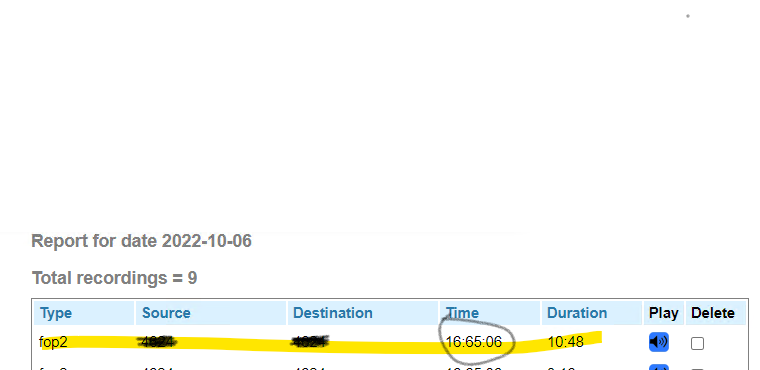
Call recording name format incompatible with FreePBX 15This monitor_filename change in fop2.cfg has a consequence for the recordings_fop2.pl script and/or the data placed in the mysql table. The content for fop2recordings.ownerextension ends up a 20 character excerpt of the filename while the field foprecordings.context is left empty. In the recordings.php grid, the "Owner Extension" column shows a 20 character excerpt of the filename while the Destination Extension column is empty.
I changed my fop2.cfg to make the filename for the recording match the one in the example picture above, which has a date field added between dest_extension and the time.
; For fop2 recording interface
; original modified 10-Oct-22 by Mike Wilson
; monitor_filename=/var/spool/asterisk/monitor/fop2-${ORIG_EXTENSION}-${DEST_EXTENSION}-%h%i%s-${UNIQUEID}-${FOP2CONTEXT}
monitor_filename=/var/spool/asterisk/monitor/fop2-${ORIG_EXTENSION}-${CLIDNUM}-%Y%m%d-%h%i%s-${UNIQUEID}-${FOP2CONTEXT}
monitor_format=wav
monitor_mix=trueThe setting for ownerextension becomes much longer. Is that updated in the newest version? I think something like this may work but I have not used Perl much:
my $fnm = $OUT;
my $basename = basename($OUT);
##my ( $exten, $targetexten, $fullmbox, $uniqueid, $context ) = split( //, $basename );_
my ( $rectype, $exten, $targetexten, $recday, $fullmbox, $uniqueid, $context ) = split( /[_-]/, $basename );I found the issue by examining the mysql table fop2records. What should be changed in the script in order to make the ownerextension field get filled out with the correct extension, and the context field get filled out?
-
Call Recordings do not play or download (separate FOP2 server)These other posts were helpful on the subject of Recordings panel in FOP2:
_https://forum.fop2.com/discussion/comment/14270#Comment_14270
https://forum.fop2.com/discussion/1816/call-recordings
https://forum.fop2.com/discussion/990/recording-tab-under-the-phonebook-looks-faulty_These were helpful with the NFS configuration, troubleshooting, and differences in setup on the two versions of CentOS:
_https://nfs.sourceforge.net/nfs-howto/ar01s07.html
https://softpanorama.org/Net/Application_layer/NFS/Troubleshooting/nfsv4_mounts_files_as_nobody.shtml
https://www.thegeekdiary.com/nfsv4-mountpoint-shows-incorrect-ownerships-as-nobodynobody-in-centos-rhel/
https://www.golinuxcloud.com/configure-nfs-server-client-rhel-centos-7-8/
https://ostechnix.com/setup-nfs-server-in-centos-rhel-scientific-linux-6-3-step-by-step/_ -
Call Recordings do not play or download (separate FOP2 server)I tracked the error message down to this section of var/www/html/fop2/download.php
if( $filename2 == "" ) {
echo "ERROR: download file NOT SPECIFIED.";
exit;
} elseif ( ! file_exists( $filename2 ) ) {
echo "ERROR: File not found.";
exit;
}Checking the NFS share ownership I see user and group of "nobody":
[root@sigmafop ~]# ls -l /var/spool/asterisk
total 8
drwxrwxr-x 3 nobody nobody 4096 Oct 10 18:19 monitor
drwxrwxr-x 4 nobody nobody 4096 Jun 4 2021 voicemail
[root@sigmafop ~]#Further checking, there are multiple NFS versions active in the process list on the server:
[root@localhost ~]# rpcinfo -p
program vers proto port service
100000 4 tcp 111 portmapper
100000 3 tcp 111 portmapper
100000 2 tcp 111 portmapper
100000 4 udp 111 portmapper
100000 3 udp 111 portmapper
100000 2 udp 111 portmapper
100011 1 udp 875 rquotad
100011 2 udp 875 rquotad
100011 1 tcp 875 rquotad
100011 2 tcp 875 rquotad
100005 1 udp 53299 mountd
100005 1 tcp 38070 mountd
100005 2 udp 39056 mountd
100005 2 tcp 51792 mountd
100005 3 udp 58335 mountd
100005 3 tcp 40259 mountd
100003 2 tcp 2049 nfs
100003 3 tcp 2049 nfs
100003 4 tcp 2049 nfs
100227 2 tcp 2049 nfs_acl
100227 3 tcp 2049 nfs_acl
100003 2 udp 2049 nfs
100003 3 udp 2049 nfs
100003 4 udp 2049 nfs
100227 2 udp 2049 nfs_acl
100227 3 udp 2049 nfs_acl
100021 1 udp 36225 nlockmgr
100021 3 udp 36225 nlockmgr
100021 4 udp 36225 nlockmgr
100021 1 tcp 49899 nlockmgr
100021 3 tcp 49899 nlockmgr
100021 4 tcp 49899 nlockmgrAlso, there are several versions of NFS in use on the client:
[root@sigmafop ~]# rpcinfo -p
program vers proto port service
100000 4 tcp 111 portmapper
100000 3 tcp 111 portmapper
100000 2 tcp 111 portmapper
100000 4 udp 111 portmapper
100000 3 udp 111 portmapper
100000 2 udp 111 portmapper
100024 1 udp 51861 status
100024 1 tcp 39364 status
100005 1 udp 20048 mountd
100005 1 tcp 20048 mountd
100005 2 udp 20048 mountd
100005 2 tcp 20048 mountd
100005 3 udp 20048 mountd
100005 3 tcp 20048 mountd
100003 3 tcp 2049 nfs
100003 4 tcp 2049 nfs
100227 3 tcp 2049 nfs_acl
100003 3 udp 2049 nfs
100003 4 udp 2049 nfs
100227 3 udp 2049 nfs_acl
100021 1 udp 60286 nlockmgr
100021 3 udp 60286 nlockmgr
100021 4 udp 60286 nlockmgr
100021 1 tcp 39903 nlockmgr
100021 3 tcp 39903 nlockmgr
100021 4 tcp 39903 nlockmgrIn conclusion, this last error with playback and download appears to be an issue with NFS permissions on the recording and voicemail directories and files. Does anyone have further advice? I am going to try disabling all but NFS4 and changing the domain of the server to match that of the client.
-
Call Recordings do not play or download (separate FOP2 server)We have installed FOP2 version 2.31.32 on CentOS 7.9.2009, a separate server from our PBX. which is running FreePBX version 12 on CentOS SHMZ 6.5
After difficulties getting Call History to display, I verified that both config.php files agreed as to the mysql user and then granted permissions to the database for local and remote user.
Now we see call history in FOP2. I can see call recordings in FOP2 as well.
Where we have difficulty is that playing a recording does nothing, and attempting to download the recording results in "Error: File not found"
We mounted /var/spool/asterisk/monitor/ on the FOP2 server using NFS but the same problem exists, although the directory is visible and can be browsed in SSH.How do we get that FOP2 Recordings panel to play or download the recordings?
-
FOP2 Recording Interface scriptsI found some answers here:
https://forum.fop2.com/discussion/1816/call-recordings
For now, I am focusing on getting the recordings panel to work, showing recordings as they are created and getting the filename to match parsing on the PBX. Currently, that filename is using the unique id in the date column. That is FreePBX 12, but regardless we need to add a phone number for the number called instead of the extension, and add the date as well as the time.
-
Telegram ChannelThat is perfect!
-
FOP2 Recording Interface scriptsThere is a section in FOP.cfg that mentions creating a post recording script and merging the recording into one file.
; You could specify your own script to be executed when the recording
; is finished. It will receive 3 parameters, the complete
; path and filename of the IN leg, the OUT leg and the final
; recording NAME. You should run soxmix in your script to join
; the recordings into one file.
;
; monitor_exec=/var/lib/asterisk/bin/postrecording-script.shHas anyone experimented with this or come up with a script to email that completed recording?
-
Insecure content requestAfter inspecting the website for issues, I found that there were repeated insecure content requests for favicon.ico referenced on the page here:
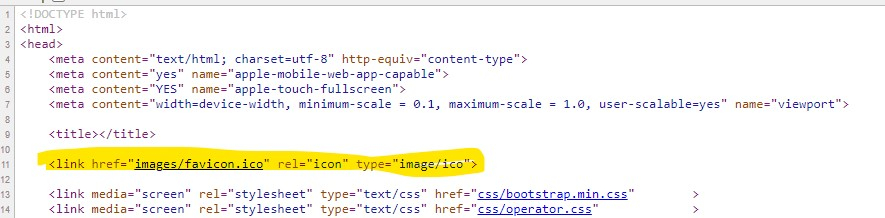
Rather than tracking down and editing all CSS to locate this I added a line to correct it in HTACCESS
Header always set Content-Security-Policy "upgrade-insecure-requests;"
This does resolve that error. -
FOP2 Extension for ChromeI found several other posts, but this one sums up the solution for URLs that are misinterpreted as a phone number even with clickable numbers turned off:
http://forum.fop2.com/discussion/5073/fop2-1-2-0-extention-problem-with-url-address#latestThis entry must be added to the Protocol Handler line text box:
tel: -
Telegram ChannelThank you for the information about the channel. Unfortunately, it is not very useful and is a one-way announcement with three announcements, only two of which are translated from Spanish. There is no support chat link and it does not replace the forum.
Am I missing something?
This would have been a lot simpler to use an existing technology like RSS and I would not have had to jump hoops to get the Telegram app to work on my personal mobile device. The desktop app itself does not work at all behind our office firewall, and I am not appreciative that I needed to link yet another chat or social media app to my personal phone.
Please explain how I can obtain paid support for FOP2 and Asternic Call Center Stats. -
FOP2 Extension for ChromeAfter some recent Chrome updates, noted a problem where certain websites will freeze up when the Fop2 chrome extension is enabled (clickable numbers are off). Also in Google Chrome some non-phone number links on a website will result in a click to call despite the clickable numbers turned off.
My current workaround is to either disable the extension or switch to Edge for those sites.
This does not happen in Microsoft Edge Chromium, fully updated.
Chrome Version 105.0.5195.127 (Official Build) (64-bit)
Microsoft Edge Version 105.0.1343.42 (Official build) (64-bit)
Fop2 chrome extension version 1.2.0
Is anybody else seeing this or have a workaround other than switching to Microsoft Edge?
Is support available? Any update or release planned? -
Presence Box DND Integration HelpI have a similar issue, presencednd is installed but no longer shows up in the list of installed plugins. The folder is still there on the server. We had some customizations several years ago. FOP2 version is 1.1.9 and when users can still use click-to-call after they change their status in FOP2 to one that should set their extension to DND. Previously, this was not the case.